
AI Training Data / Tabletop Sweeping / Original EGO R8 application guide; Phantom sweeping research / Oct 27, 2026
AI Training Video Collection: Tabletop Sweeping with R8
Plan AI training video collection with EGO R8 for tabletop sweeping: global-shutter stereo, hardware synchronization and timestamped visual-inertial records.
How can R8 support AI training video collection for sweeping?
- Record the brushing hand, dustpan-holding hand and moving pieces in one complete R8 take.
- Preserve dual global-shutter observations synchronized by the common hardware trigger.
- Retain the selected 100 / 200 / 500 Hz IMU setting, unified timestamps and supplied calibration.
- Researchers prepare pass labels, review code, learning inputs and corresponding robot trials.
AI training video collection becomes easier to review when a recording follows a visible change from start to finish. Tabletop sweeping provides that change: one hand moves a brush, the other steadies a dustpan, and loose pieces travel from the table into the pan. EGO R8 can record this human demonstration through its head-mounted, dual global-shutter stereo cameras. This guide develops a proposed laboratory collection around brush pickup, first contact, successive passes and the final arrangement of the pieces.
Research basis: a brush-to-dustpan task
Stanford's Phantom research investigates learning robot manipulation from human video demonstrations. Its documented Sweep Trash task involves collecting a brush and moving several loose pieces into a dustpan. That task supplies the practical motivation for this R8 guide. The capture plan below uses the R8 manufacturer's confirmed specifications; the laboratory team supplies the collection protocol, video review, training preparation and separately organized robot trials.
Define a complete sweeping demonstration
Prepare a brush, a dustpan and a small group of lightweight pieces on a tabletop. Give the starting arrangement a setup identifier. Use one hand to move the brush and the other to grip the dustpan handle, keeping the pan's front lip against the tabletop. Before putting on R8, decide what a complete take should contain: the brush at rest, the pickup, the approach to the pieces, their movement toward the pan and a clear view after the brush lifts. A collection built around the whole transfer preserves both the action and its visible result.
Frame the brush, pieces and pan entrance
R8's fixed-focus lenses have documented fields of view of 115° horizontally and 80° vertically. Use a rehearsal to place the work area so both hands, the brush, moving pieces and dustpan entrance remain visible together from the wearer's forehead position. Review the saved images when the hand reaches furthest forward and when the brush returns for another pass. The pan's front lip is a useful visible boundary: reviewers need to see pieces approach it, cross it or remain on the table.
Keep each contact phase paired across R8 views
A sweep may move several pieces differently. Some enter the pan during the first pass while others remain near the brush. R8's two global-shutter sensors expose the pixels in each frame simultaneously, making their acquisition behavior relevant to the moving bristles and changing hand direction. The cameras share a common hardware trigger or shutter signal. Preserve the corresponding left and right observations around brush contact and pan entry so a reviewer can examine the same action phase in the synchronized pair.
Label the visible state after each pass
For each take, create a compact review sheet with the setup identifier, take identifier and the visible state before and after each pass. Researchers can note the first brush contact, a piece crossing the pan lip, the brush lift and any remaining pieces. Attach these notes to the selected R8 frame references. A close view of the brush alone leaves the destination out of the review; retain enough surrounding footage to show how the tool, pieces and pan relate throughout the transfer.
Review viewpoint motion with the sweeping interval
The integrated R8 six-axis IMU supports selectable sampling at 100, 200 or 500 Hz. Camera frames and IMU samples have unified timestamps. When a wearer looks between the brush and the pan, preserve that session's selected sampling rate and its recorded motion samples with the images. Researchers can use the timing references to review a head turn during a particular sweeping pass. For example, the illustrated session code records a 200 Hz choice alongside paired image references and a researcher-entered brush-contact label.
Associate the working images with calibration
The manufacturer specifies per-unit calibration support, including camera intrinsics, distortion coefficients and stereo extrinsics where applicable. Associate the supplied calibration record with the R8 unit and capture profile used for the sweeping session. When selecting a crop around the brush and pan lip for later analysis, keep the original stereo observations and document the crop. This preserves a route from a reviewed patch of moving pieces back to its source images and the camera information supplied with that unit.
Organize corresponding human and robot actions
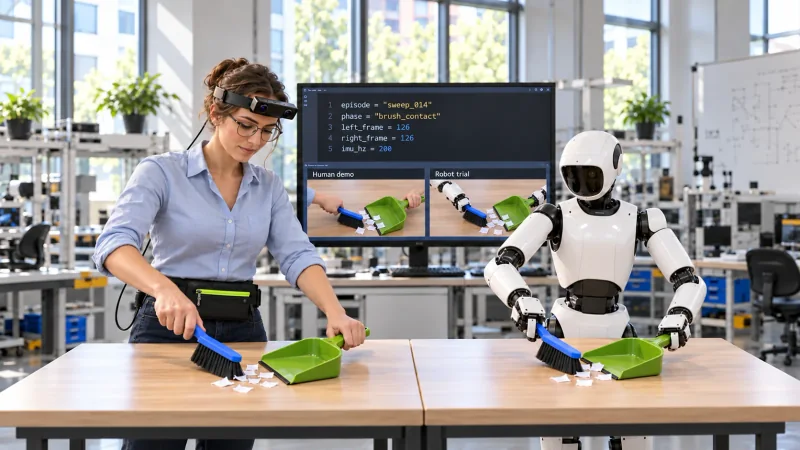
The laboratory can prepare a robot-learning study around the same two-hand brush-to-dustpan instruction. Researchers arrange the robot's workspace, prepare the learning inputs and review a separate robot trial at a corresponding brush-contact or pan-entry phase. Keep the human take and robot trial under their own identifiers. The illustration shows the human and robot each holding a brush with one hand and steadying the pan with the other, while the monitor presents example review code and human/robot video panes. The code, labels, training and correspondence are work prepared by the research team.
Prepare the R8 collection package
R8 uses USB 2.0 and is specified for a DC 5 V supply with a maximum working current of 320 mA. Check the recording host and waist-carried power connection during the rehearsal, including the reach toward the far side of the pan. SDK/API provision is listed for capture integration; discuss the required interface and delivered recording profile with the EGO team. Preserve the original visual records, configured IMU data, timing references, calibration files and review sheet as one identifiable collection package. This gives AI training video collection a focused subject: how a demonstrated tool action changes the positions of several objects.