
Robot Learning / Tool-Surface Interaction / Original EGO R9 application guide; EgoZero whiteboard-erasing research / Oct 20, 2026
Egocentric Video for Robot Learning: Whiteboard Erasing with R9
Record egocentric video for robot learning with R9: 1080P, 30 FPS whiteboard-erasing demonstrations, timestamped review and corresponding robot task phases.
How can R9 capture whiteboard-erasing demonstrations for robot learning?
- Record the reach, pickup, wiping passes and tool return with the documented R9 1080P, 30 FPS global-shutter profile.
- Set the adjustable camera angle within the 120° wide-angle view to frame the eraser and working board area.
- Use R9 global timestamps to reference researcher-reviewed tool-contact and surface-change events.
- Researchers organize human recordings and robot trials by corresponding task phases, with separate recording references.
Egocentric video for robot learning can preserve the relationship between a tool, a hand and the surface being changed. Whiteboard erasing makes that relationship visible: the hand collects an eraser, brings it against the board and moves it across the marks. EGO R9 offers a head-mounted recording position with documented 1080P video at 30 FPS and a global shutter. For a proposed whiteboard-erasing collection, its role is to record the demonstrator's view of the contact sequence and the changing board surface.
Research basis: a documented whiteboard-erasing task
Liu and colleagues' EgoZero research includes an 'Erase board' task in which a robot collects an eraser and uses it on a whiteboard. The original paper documents human egocentric demonstrations and robot evaluation; the official project presents the corresponding human and robot task videos. That documented task motivates this R9 capture plan. The R9 specification supplies the camera information below, while the collection team defines the recording protocol, review labels and subsequent learning experiment.
Frame the eraser-to-board movement with R9
Arrange the R9 viewpoint around the full movement from the eraser's starting place to the marked area. Its specified 120° wide-angle lens and adjustable camera angle help the wearer frame the hand, eraser and relevant board edges together. Set the angle while reaching naturally toward the board, then check a short test clip with the eraser on the table and at the highest intended wiping position. Choose the board position from that observed framing, keeping the main working area inside the recorded image.
Select the R9 recording profile and review a wiping pass
Record the selected standard 1080P, 30 FPS R9 profile in the take notes. The global-shutter specification is relevant to a scene containing repeated hand sweeps and changes in head direction. Review a short back-and-forth wiping sequence at the planned room lighting, checking the eraser outline and the visible marks immediately around it. Include the lift between passes in the review so the recording preserves when the tool is against the board and when it is moving to another starting point.
Capture pickup, surface contact and tool return
For each planned R9 take, begin with the eraser at its recorded starting place and the marked board visible. Capture the reach and pickup, the approach to the surface, the wiping passes, the final lift and the return of the tool. Let the recording continue long enough to show the resulting board area after the hand moves away. A researcher can then inspect the initial marks, the portion revealed behind each pass and any area addressed by a later pass as one continuous demonstration.
Label visible events against R9 timestamps
Use the global timestamps supported by R9 to reference observable events within that recording. Reviewers can label eraser pickup, first visible board contact, direction changes, lift-off and tool placement. Attach those labels to the original take identifier and time intervals. For a pass with a hand partly covering the eraser, retain the surrounding frames in the same review segment: they show the approach, the emerging erased strip and the subsequent lift. The labels are the research team's interpretation of the recorded sequence.
Record the starting arrangement for each demonstration
Plan repeated R9 recordings around documented starting arrangements. EgoZero's experimental setup varies the board and eraser positions; an R9 pilot can likewise log where those items begin, which hand acts and which board area is assigned for erasing. Keep the chosen arrangement with every take so a reviewer can relate the pickup and sweep to the available workspace. Before accepting a recording, inspect whether the relevant tool movement and visible surface changes remain interpretable from the first-person view.
Review corresponding human and robot wiping phases
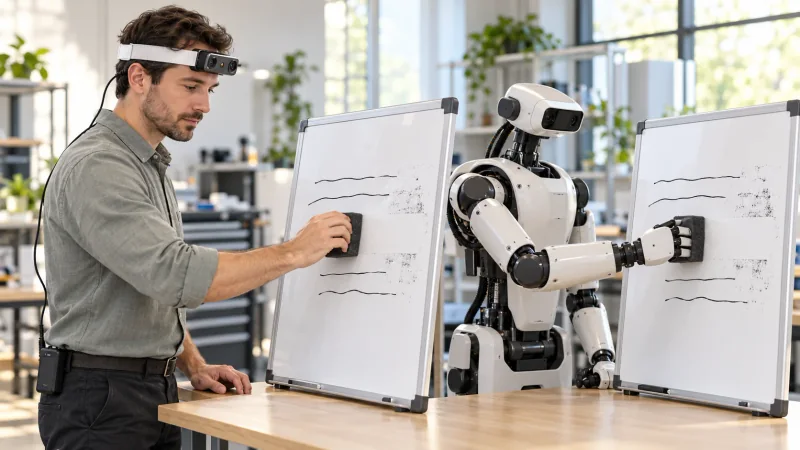
For human-to-robot review, select a visible phase such as the eraser halfway across a marked band. Researchers can organize an R9 human demonstration and a separately identified robot trial around that same phase, then review the approach, sweep and release in each sequence. The illustration presents the human and robot performing corresponding wiping actions side by side. The team schedules the robot trial, prepares the learning procedure and aligns the review clips; each recording retains its own timing reference and trial identifier.
Keep R9 video files and task notes traceable
R9's documented H.265 video and MP4 format provide a defined original recording to keep with the whiteboard take notes. Its T-Flash memory-card support is useful for organizing the captured files, while external-battery support informs preparation for repeated demonstrations. Keep the original MP4, the board-arrangement notes and the timestamped review labels under one take identifier. Check a sample file before the session, and verify that any selected action excerpt can be traced back to the intended complete recording.
Define a focused R9 whiteboard-capture pilot
A useful R9 whiteboard pilot starts with a specific question: can reviewers follow the transition from picking up the eraser to changing the visible marks and putting the tool down? Define that question, set the camera angle and review a short take before expanding the collection. This gives egocentric video for robot learning a concrete subject and an auditable recording workflow. Discuss the required R9 recording profile and sample footage with the EGO Camera team when planning the capture session.
Research references and confirmed R9 specifications
EgoZero research - egocentric demonstrations and whiteboard erasing