
Robot Learning / Visual-Inertial Data / Original EGO R8 application guide; EgoMimic and EgoMe research / Oct 31, 2026
Egocentric Video with IMU: Repeated Bowl Tasks with R8
Use EGO R8 egocentric video with IMU to organize repeated object-in-bowl demonstrations for robot-learning research.
How can R8 support egocentric video with IMU for robot learning?
- Capture complete object-in-bowl repetitions with synchronized R8 stereo cameras.
- Keep six-axis head-unit IMU samples and video frames together using their unified timestamps.
- Researchers identify pickup, placement, bowl lift and emptying in each cycle.
- Retain the selected IMU rate and supplied calibration with each research session.
Egocentric video with IMU gives a research team a way to study a person's view and head movement during a sequence of object interactions. In this proposed EGO R8 collection, a wearer repeatedly places a small soft object in a bowl, lifts the bowl and empties it onto a table. R8 combines head-mounted stereo video with six-axis IMU samples and unified timestamps, allowing researchers to organize visual and motion records around each observed action phase.
Research basis for continuous object-in-bowl demonstrations
The EgoMimic research supplement describes a continuous object-in-bowl task in which a robot picks up a small toy, places it in a bowl, lifts the bowl and empties the toy onto a table before repeating the sequence. The EgoMe research dataset (https://huggingface.co/datasets/HeqianQiu/EgoMe) also documents first-person video and inertial observations for human demonstration research. These publications motivate the collection workflow below; the R8 characteristics come from its manufacturer specification and product page.
Define a repeatable demonstration cycle
Prepare a bowl and a small soft object on a clear work surface. Give the setup and each take an identifier. Record complete repetitions from the initial pickup through placement, bowl lift and emptying, continuing into the next pickup. During review, mark the start and end of each cycle so researchers can find both the individual action and the transition between consecutive repetitions.
Record synchronized stereo views of each phase
Place the working area where the R8 wearer can see the object and bowl throughout the sequence. A short rehearsal lets the team check visibility at object release and while the bowl is tilted. R8's two global-shutter cameras share a hardware trigger or shutter signal. Retain the corresponding stereo observations for each selected phase so that reviewers can inspect the same moment from both camera views.
Associate head motion with video intervals
The R8 head unit includes a six-axis IMU with selectable 100, 200 or 500 Hz sampling. Its video frames and IMU samples use unified timestamps. Keep the configured sampling rate and original timing references with each recording. A researcher can then locate the head-motion samples associated with a visible interval, such as a change in viewpoint between placing the object and lifting the bowl. The IMU describes motion of the worn head unit; the hands and object are reviewed in the video.
Organize cycle and phase annotations
For each repetition, the research team can annotate pickup, placement, bowl lift and emptying using frame references, then associate the marked time intervals with the head-unit IMU stream. Recording the cycle number and visible object state helps reviewers distinguish a completed placement from the next pickup. A shared session identifier connects the notes to the original stereo and inertial records without replacing them.
Prepare corresponding robot-learning observations
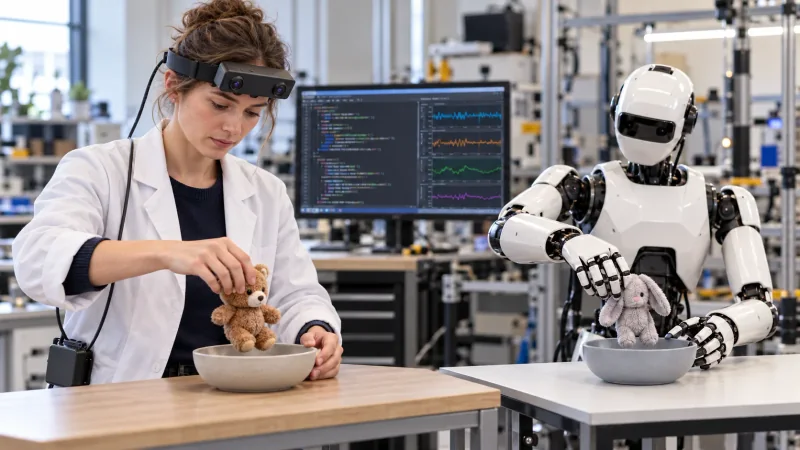
To prepare a robot-learning study, researchers can use the human demonstrations to organize training examples around these same task phases. They can arrange a separate robot trial with its own bowl and object, then inspect a robot action alongside the corresponding human phase. The illustration represents this research setup: a person and a robot are shown at the same stage, while a laboratory monitor displays example code and signal traces prepared for data review.
Preserve calibration and collection records
R8 supports per-unit calibration information, including camera intrinsics, distortion coefficients and stereo extrinsics where applicable. Keep the supplied calibration with the unit and capture session, together with the selected IMU rate and frame timing. R8 uses USB 2.0 and its specification lists SDK/API provision for capture integration. The resulting collection package can preserve the original observations, timestamps, calibration and researcher-created cycle annotations for later analysis.
Research references and confirmed R8 specifications
EgoMimic supplementary paper — continuous object-in-bowl task