
Electrical Wiring Capture / Original EGO R8 guide; Phoenix Contact wiring reference / Sep 28, 2026
EGO R8 for Electrical Wiring Workflow Capture
Record electrical wiring workflows with EGO R8: dual global-shutter stereo, hardware synchronization, selectable IMU rates, unified timestamps and USB capture.
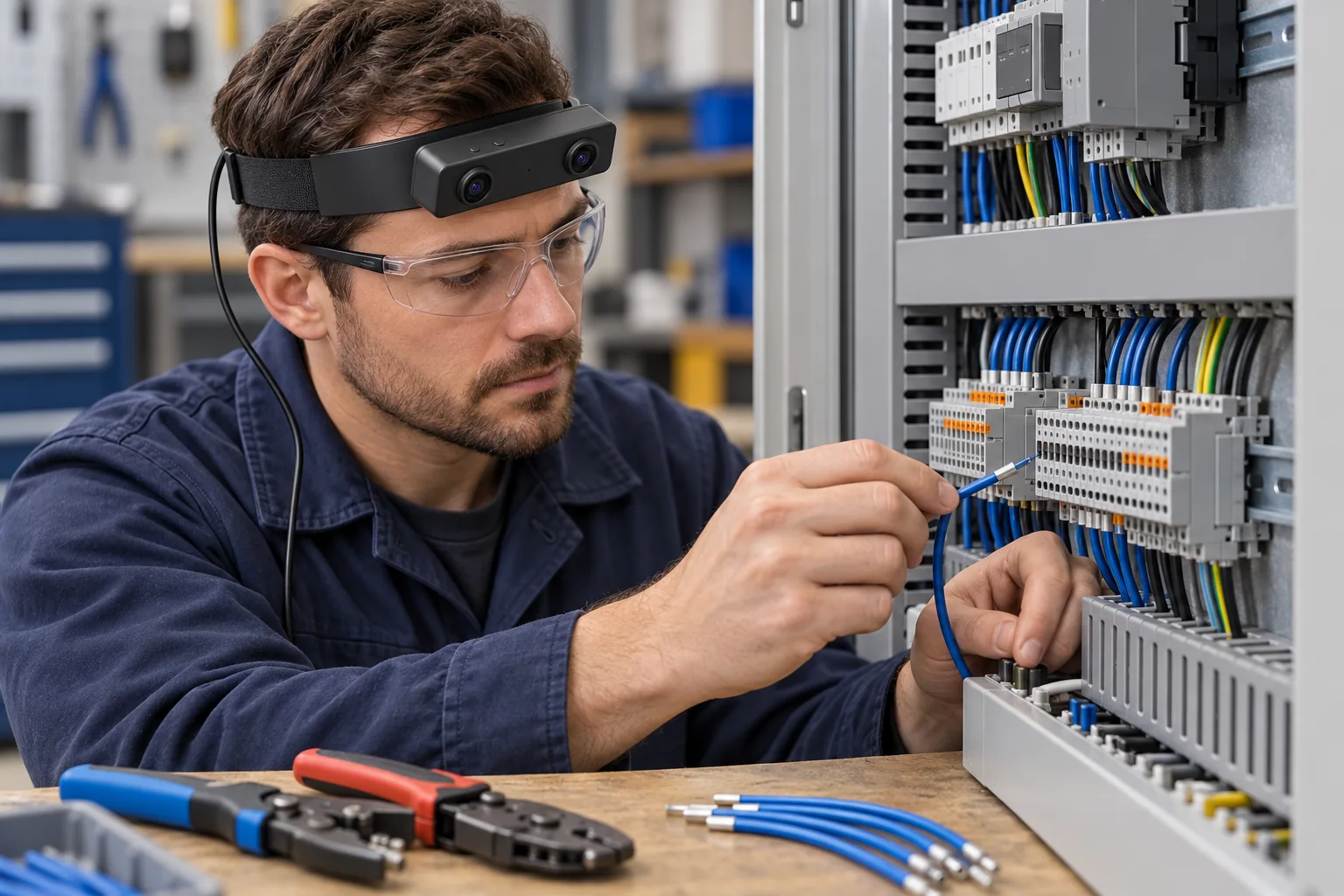
How can R8 support an electrical wiring recording project?
- Head-mounted stereo views record the hands, wire and terminal from the electrician’s working position.
- Dual global-shutter sensors use a common hardware trigger or shutter signal.
- A 6-axis IMU offers 100 / 200 / 500 Hz sampling, with unified camera and IMU timestamps.
- USB capture settings and per-unit calibration information accompany the recorded wiring sequence.
EGO R8 is a head-mounted USB stereo camera for first-person data collection. Its dual global-shutter sensors, common hardware trigger and synchronized camera–IMU timestamps are relevant to recording an electrician’s hands as they work with wires, tools and terminals. This guide develops a proposed R8 recording plan around control-cabinet wiring: a defined panel-assembly task, a visible handling sequence and paired video that a project team can review and annotate.
Define a control-cabinet wiring task
Phoenix Contact’s official control-cabinet mounting and wiring guide describes conductor connection, marking and hand-tool operations including cutting, stripping and crimping. These documented activities supply the application context for the R8 capture plan. Scope the recording to a de-energized panel assembly task performed by a qualified electrician. Identify the terminal row, wire set and applicable assembly instructions before recording, so the footage has a specific task and a clear endpoint.
Frame the wire end, hands and terminal
R8’s fixed-focus lens has a specified horizontal field of view of 115° and vertical field of view of 80°. Review a short stereo sample with the electrician standing or seated at the actual cabinet. Check both views for the wire end, fingers, tool jaws and terminal entry as the hands move between wire preparation and connection. Choose the wearing position from those recorded views, keeping the relevant working area in frame throughout the selected operation.
Capture wire preparation with global shutters
During wire preparation, R8’s dual global-shutter sensors expose the pixels in each sensor simultaneously. That characteristic is relevant when a hand presents a wire, closes a crimping tool or moves toward the terminal row. Capture representative examples of these movements and inspect the recorded frames at the selected video mode. The review can concentrate on the visible hand–tool–wire relationship that the project intends to describe.
Keep terminal-connection moments paired
R8 synchronizes its cameras using a common hardware trigger or shutter signal. For the terminal-connection portion of the recording, preserve the corresponding left and right frames together: a reviewer can then examine the same moment as the wire end approaches the terminal and the fingers reposition around it. Keep the paired views through segment selection and annotation, with each excerpt linked to its original recording.
Associate head movement with the video timeline
R8 includes a 6-axis IMU with selectable 100, 200 or 500 Hz sampling and unified timestamps for camera frames and IMU samples. When the electrician shifts attention from the preparation area to the terminal row, the head-mounted unit records its own inertial data alongside the image sequence. Retain the selected sampling rate and original timestamps so the team can associate camera movement with the corresponding wiring segment.
Choose the delivered R8 video configuration
The R8 manufacturer’s main table lists 1600 × 1200 at 30 fps and H.264/H.265 output. Its separate USB mode table lists MJPG at 1920 × 1080 and 30 fps, and YUY2 at 1920 × 1080 and 15 fps; both formats also list 1280 × 720 and 640 × 480 at 30 fps. Confirm the delivered resolution, codec, frame rate and simultaneous stereo-stream configuration against these tables. Use a sample of the actual terminal and wire-handling task when reviewing the selected mode.
Keep calibration information with the stereo sequence
The R8 document describes per-unit calibration information: camera intrinsics, distortion coefficients and stereo extrinsics where applicable. Keep the supplied file associated with the R8 unit and recording configuration when preparing paired wiring footage for subsequent stereo analysis. The unit identifier, calibration-file version and original image dimensions give the project a consistent record of how each sequence was acquired.
Prepare the USB recording connection
R8 connects through USB 2.0 and specifies DC 5 V power with a maximum working current of 320 mA. Plan the capture-host position and cable route around the electrician’s working stance. The manufacturer also lists SDK/API provision; use the supplied interface documentation when setting up the project’s recording software. Verify that the sample session retains both camera streams, the chosen IMU data and their timing information before collecting the full task sequence.
Label the visible wiring stages
The project team can manually label visible stages in the R8 footage, such as presenting the wire, using the preparation tool, positioning the conductor at the terminal and showing the completed connection area. Associate each label with a time interval and the paired frames, then review whether the relevant objects and actions remain visible. These labels organize the recorded demonstration around the electrician’s observable work.
Plan an R8 electrical-wiring capture pilot
For an R8 electrical-wiring capture pilot, start with one defined panel task and a short recording that includes wire preparation and terminal connection. Review the framing, synchronized stereo pair, selected video mode, IMU timing and associated calibration information as one capture package. Bring that sample-task description and the desired R8 configuration to the EGO product team when discussing hardware samples and integration.