
Hand–Object Interaction / Dataset Capture / Original EGO R9 application guide; ARCTIC bimanual manipulation research / Oct 17, 2026
Hand Object Interaction Dataset: Laptop Handling with R9
Build a hand object interaction dataset with EGO R9: record two-handed laptop opening and closing using 1080P global-shutter video and timestamps.
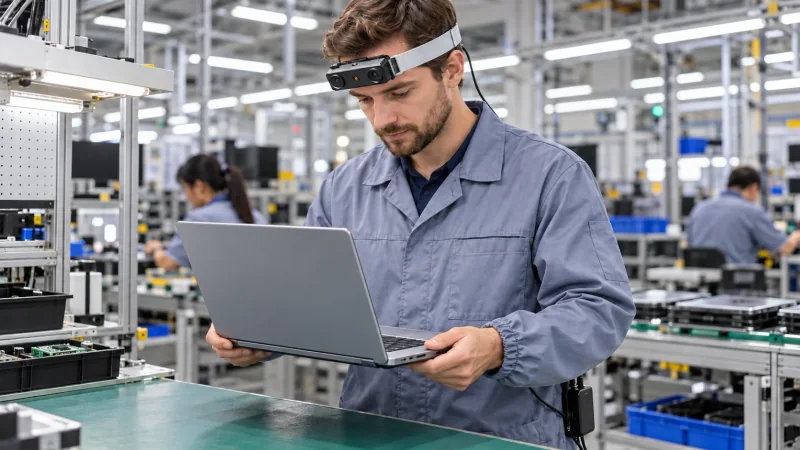
How can R9 support a hand object interaction dataset?
- Record two-handed laptop handling, opening and closing with R9’s 1080P global-shutter video at 30 FPS.
- Set the 120° lens and adjustable camera angle to include both hands, the laptop base and the moving lid.
- Researchers label hand roles, visible contact and lid states, linking each annotation to the R9 recording’s timestamps.
- Keep original H.265 MP4 recordings and the take index together for traceable dataset review.
Explore EGO R9 specifications and manufacturer documentation
A hand object interaction dataset needs a clear record of which hand touches which part of an object and how that object changes during manipulation. EGO R9 can provide first-person recordings for a focused collection at a factory workbench: both hands grasp and position a laptop, then one steadies the base while the other opens or closes the lid. This proposed workflow combines R9's 1080P global-shutter video at 30 FPS with a research team's labels for hand roles, visible contact and lid state.
A research-grounded task: two hands and a hinged object
ARCTIC, presented by Fan and colleagues at CVPR 2023, studies two-handed manipulation of articulated objects and explicitly includes laptops. Its research connects changes in an object's configuration with the hands acting on it, and includes egocentric recordings. That documented laptop interaction provides the basis for this proposed R9 task. The collection team defines the factory-workbench arrangement and annotation plan below; the camera's recording settings are taken from the R9 manufacturer specification.
Capture the complete laptop interaction
Begin an R9 take as the demonstrator grasps a closed laptop at both side edges and places it on a clear factory workbench. Continue the recording as one hand stabilizes the base and the other grasps the display edge, lifts the lid, pauses and lowers it again. Keep the final release of both hands in the take. Assign the laptop an object identifier and describe the sequence as 'position, open and close the laptop.' The recording preserves the transition from a two-handed grasp to different supporting and moving hand roles.
Set the R9 view for the base and moving lid
R9's adjustable camera angle and 120° wide-angle lens provide the setup controls for this tabletop view. At the demonstrator's normal working position, record a short trial and inspect both hands, the base edge and the moving display throughout its travel. Use the standard 1080P, 30 FPS setting for the collection and retain that setting in the session record. R9's global shutter exposes the image pixels together within each frame, a relevant imaging characteristic when the display moves or the wearer follows it with a head movement.
Label the supporting hand and the moving hand
During review of the R9 video, give the laptop base and lid separate part labels beneath the same object identifier. For each selected interval, the research team can record 'left hand holds base' and 'right hand moves lid,' then update the labels when either hand changes its role. Describe visible hand contact and the observed lid state: closed, opening, held open or closing. Keeping object parts explicit makes an open display distinguishable from a closed laptop that has simply been repositioned on the table.
Link contact transitions to R9 timestamps
Use R9's global timestamps to link those labels back to the original recording. Reviewers can mark the first visible touch, the start of lid movement, a pause, movement in the opposite direction and the final hand release. Retain the original time reference when extracting a shorter clip. A label then identifies both the observed action and the exact R9 interval supporting it, so another reviewer can return to the same contact transition and inspect the surrounding frames.
Keep repeated demonstrations clearly identified
For additional R9 takes, record changes in hand roles or starting lid state as explicit session conditions. For example, a second demonstration can begin with the lid partly open and capture the remaining opening motion. Review each take for a usable view of the supporting hand and the hand moving the display. Keep the complete take associated with its selected excerpts, including any grip adjustment. The collection team defines these conditions and annotations as part of the proposed dataset protocol.
Organize R9 files for dataset review
R9 supports T-Flash storage and records H.265 video in an MP4 container. Keep the original MP4 files together with a take index containing the laptop identifier, capture setting, initial lid state and reviewed time intervals. External-battery support allows the power arrangement to be prepared before repeated tabletop demonstrations. Check playback after a short trial, then keep the same file-to-label naming convention throughout the collection. These steps organize the camera recordings into traceable material for the team's analysis.
Plan a focused R9 capture pilot
The resulting hand object interaction dataset can be organized around a concrete research question: how do two hands coordinate to change the state of a hinged object? R9 supplies the head-mounted video, documented capture settings and recording timestamps; researchers prepare the hand-role annotations and their analysis of the laptop sequences. To plan an R9 sample evaluation, share the intended table setup, the lid-opening and closing actions, and the required recording format with the EGO Camera team.
Research references and R9 specifications
ARCTIC research — bimanual manipulation of articulated objects
Explore EGO R9 specifications and manufacturer documentation