
Healthcare Workflows / Original EGO R9 application guide; personal-care context from NHS / Sep 20, 2026
Care in Focus: Bedside Healthcare Workflow Recording with EGO R9
A nurse prepares bedside items, arranges a pillow, and helps an adult patient with everyday care. EGO R9 brings the caregiver’s viewpoint into focus through adjustable framing, 1080P global-shutter recording, and shared timing for image and motion data.
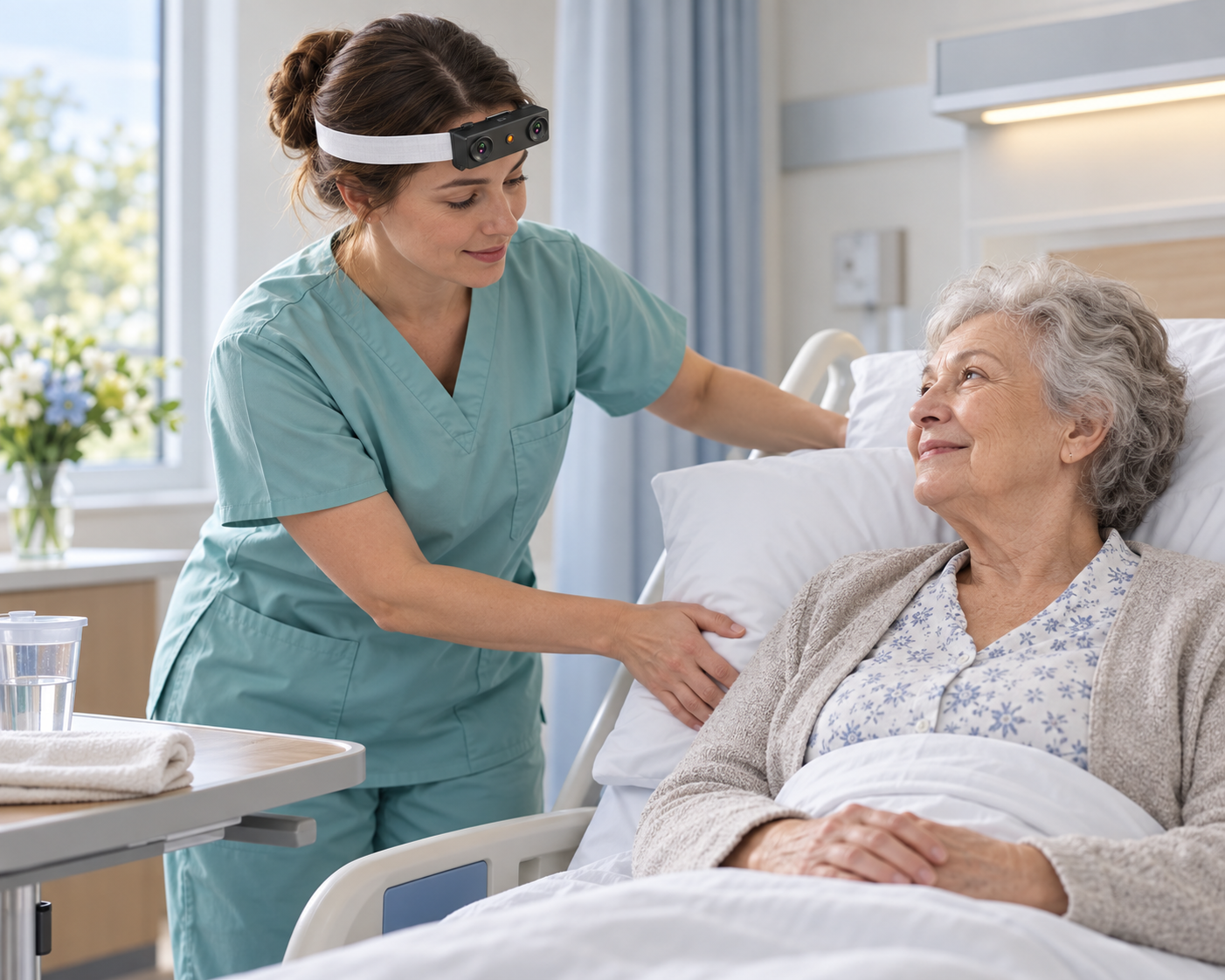
At an adult patient’s bedside, a nurse prepares a towel, arranges the nearby care items, adjusts a pillow, and helps the person settle comfortably. The work is a sequence of attentive hand movements and changes in viewpoint. EGO R9 records that visible workflow from the caregiver’s forehead, following the relationship between the hands, the prepared items, and the bedside space through an agreed care demonstration.
The NHS personal-care guide describes support with everyday washing and the importance of the person’s comfort and preferences. It provides the care context for this article. The R9 recording plan is arranged with the care team and the person taking part, with appropriate consent and agreed access to the footage. The team follows its established care procedure while the recording documents the visible activity.
R9 supports an adjustable camera angle and a 120-degree wide-angle lens. Use a brief trial recording at the bedside to frame the caregiver’s hands and the area where the towel or pillow is being handled. Check the view when the caregiver looks toward the prepared items and returns attention to the patient. Setting the angle before the demonstration helps keep the selected bedside task in frame as the wearer changes position.
The standard R9 video configuration is 1080P at 30 FPS, with global-shutter imaging. The shutter exposes the image pixels simultaneously, a relevant feature when a hand crosses the view or the caregiver turns toward the bedside table. Review a short sequence of reaching, arranging an item, and returning to the task under the room’s actual lighting. A 60 FPS configuration is optional; keep the delivered setting in the session record.
A bedside demonstration can be organized into preparation, item placement, pillow adjustment, assistance with a sleeve, and completion of the care interval. R9’s head-mounted viewpoint follows the caregiver’s attention as these actions unfold. Reviewers can manually select clips that retain the start and finish of each movement, including the brief pauses when the caregiver checks the person’s comfort or prepares the next item.
R9 integrates a 6-axis IMU with a sampling rate above 200 Hz. Its samples describe the camera wearer’s movement while looking down at the task, turning toward supplies, or returning to the bedside. Preserve the inertial recording with the video so the review team can examine a change in viewpoint together with the corresponding hand movement. Record the session settings alongside the selected footage.
A synchronized shared unified clock and global timestamps are supported by R9. These timing features help align image and motion data through the care interval. Reviewers can manually mark a reach toward the towel, the beginning of a pillow adjustment, or the final placement of an item, then use the timestamps to locate those moments. Check continuity across each transition before preparing the clips for the team’s review.
R9 supports MP4 video, H.265 encoding, and T-Flash memory-card storage. Prepare the card and recording profile before the demonstration, then verify that the saved files open and contain the intended beginning and end of the session. Retain the original files alongside the shorter review clips, with a session identifier and the agreed care-phase labels. This keeps the recording organized around the actual bedside workflow.
Camera-intrinsics support is also listed for R9. Teams processing the images can keep the supplied camera information associated with the device and session. For a bedside sequence, that association preserves the capture context behind the selected views of hands, pillows, towels, and clothing during later image processing. It belongs with the source footage and timing records in the session package.
The completed R9 record lets the care team revisit the visible sequence from the caregiver’s perspective: preparing the bedside area, reaching for an item, arranging a pillow, and completing an agreed assistance task. Adjustable framing and global-shutter video capture the scene, while inertial samples and shared timing retain the associated camera movement. Together with manually prepared labels, these records organize a healthcare demonstration around the actions that were actually recorded.
References: NHS, “How to help someone you care for keep clean” — https://www.nhs.uk/social-care-and-support/practical-tips-if-you-care-for-someone/how-to-help-someone-you-care-for-keep-clean/ . R9 product specifications — https://egocamera.com/r9.html .