
Human Demonstrations / Carton Forming / Original EGO R8 application guide; EgoSteer box-folding research / Oct 17, 2026
Human Demonstration Data for Robotics: Box Folding with R8
Capture human demonstration data for robotics with R8: synchronized stereo video of paperboard box folding, visible hand contact and changing carton states.
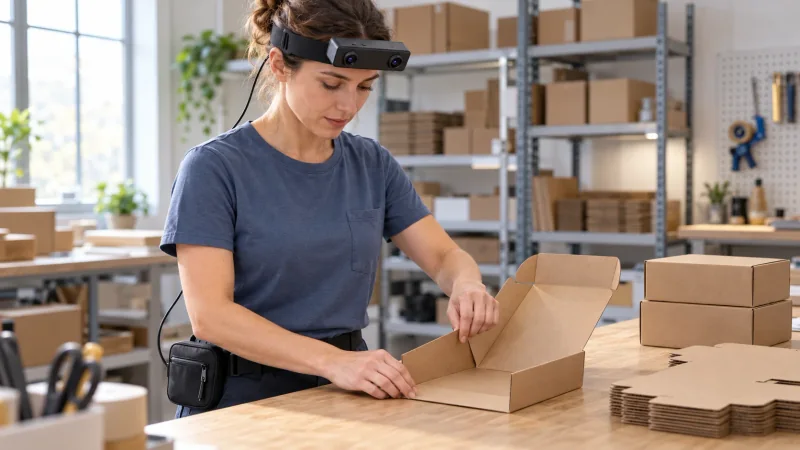
How can R8 capture box-folding demonstrations for robotics?
- Record the carton-forming process from the operator’s viewpoint with R8’s dual global-shutter stereo cameras.
- Preserve corresponding left and right observations using the documented common hardware trigger and original timestamps.
- Frame the flat blank, moving walls and both hands with the listed 115° horizontal and 80° vertical field of view.
- Researchers review carton-state intervals and retain the calibration reference and capture settings with each complete take.
Explore EGO R8 specifications and manufacturer documentation
Human demonstration data for robotics can document how a flat paperboard blank becomes a formed box through coordinated hand movements. EGO R8 brings head-mounted stereo recording to this proposed packing-bench collection: the demonstrator steadies the base, raises the walls and forms the carton while the cameras follow the working view. R8's dual global-shutter sensors and common hardware trigger support paired observations of the moving hands and changing cardboard shape. The research team defines the demonstrations and reviews the recorded material for learning experiments.
Research context: box folding as a manipulation task
EgoSteer, by Zhong and colleagues, studies robot learning from egocentric human video and includes box folding among its long-horizon manipulation tasks. Section 6.5 and the paper's experimental illustrations establish box folding as a concrete research task. Here, that task motivates a proposed R8 collection of human carton-forming demonstrations at a packing bench. The R8 hardware characteristics come from its manufacturer specification; the collection instructions and manual review described below are a plan for the research team.
Keep the transition from blank to box in the R8 take
For an R8 trial, choose a scored paperboard blank with a known folding pattern and keep its initial arrangement visible. Let the demonstrator hold the base against the bench and raise a wall along its crease, then continue the folds required by that blank until the box is formed. Preserve changes of grip, rotation of the carton and the final hand release in the recording. Keep a reference to the blank design with the take so reviewers can relate the visible panels to the intended box shape.
Frame the material as its shape changes
R8 has fixed-focus optics and a listed field of view of 115° horizontally and 80° vertically. Use a short sample from the demonstrator's normal bench position to inspect the full blank, both hands and the raised walls in both camera views. Framing should cover the region where the initially flat material rises above the tabletop. Check that the fold remains visible as the operator turns the carton to work on another side, then retain that wearing position for the session.
Preserve stereo observations of each fold
The R8 specification describes synchronized stereo video at 30 fps, dual global-shutter sensors and a common hardware trigger or shutter signal. Each sensor exposes its pixels together within a frame, while the trigger associates the two camera observations. For the folding take, preserve the left and right images around the moment a wall lifts, a hand presses a crease or a grip changes. A reviewer can examine corresponding observations of the same panel movement when choosing an interval for closer analysis.
Review panel states and changes of grip
Review the R8 footage in terms of the cardboard's visible condition. Useful proposed labels include 'blank flat on bench,' 'wall being raised,' 'wall held upright' and 'formed box released.' Attach each label to the relevant panel and to the R8 camera timestamps. When the demonstrator rotates the box, retain the panel identity rather than renaming it by its new screen position. These are human-reviewed descriptions of the recorded folding, with the complete stereo take retained alongside selected excerpts.
Associate the R8 calibration with the recorded geometry
R8's manufacturer documentation describes unit-specific calibration support: camera intrinsic parameters, distortion coefficients and stereo extrinsic parameters where applicable. Retain the delivered calibration file with the camera-unit identifier and capture settings for the carton session. This association matters when the research team prepares the two views for geometric review of the raised walls and base. Keep the original image coordinates available and record any resizing or cropping used to create review clips, so derived material stays traceable to its R8 source.
Prepare the USB recording connection at the bench
Connect the R8 recording setup through its documented USB 2.0 interface and prepare the specified DC 5 V power arrangement before the hands enter the folding area. The manufacturer lists a maximum working current of 320 mA and SDK/API delivery. Use the delivered interface documentation to arrange the project's capture files and timing records. Save a short folding take, inspect the corresponding views and replay it through the team's review software before proceeding with the planned set of demonstrations.
Organize repeated carton-forming demonstrations
For repeated R8 takes, record the blank identifier, starting orientation and the instruction given to the demonstrator. Keep naturally occurring regrips and intermediate carton rotations linked to their original timing. Researchers can select examples showing the same panel transition from different starting arrangements while retaining each complete demonstration. Organize human demonstration data for robotics around the paired recordings, calibration reference, actual capture settings and reviewed carton-state intervals. The research team prepares the learning inputs and evaluates its own method using that documented collection.
Plan a focused R8 sample collection
An R8 carton-forming pilot can begin with one blank design and a clearly described finished shape. Review whether the saved stereo views show the base, moving walls and hands across the complete fold, and whether each selected interval leads back to the original recording. Share the blank design, bench arrangement, capture requirements and required SDK/API deliverables with the EGO team when configuring R8 for the project. This keeps the collection centered on a specific human skill and the camera's documented recording functions.
Research reference and R8 product evidence
EgoSteer research — box folding and egocentric human data
Explore EGO R8 specifications and manufacturer documentation