
Football Movement Capture / Original EGO R10 guide; FIFA Training Centre practice reference / Sep 29, 2026
EGO R10 for Multi-Player Football Movement Capture
Plan multi-player football movement recordings with EGO R10: synchronized camera views, 1600 × 1200 at 30 fps and configured 6-axis IMU data for human review.
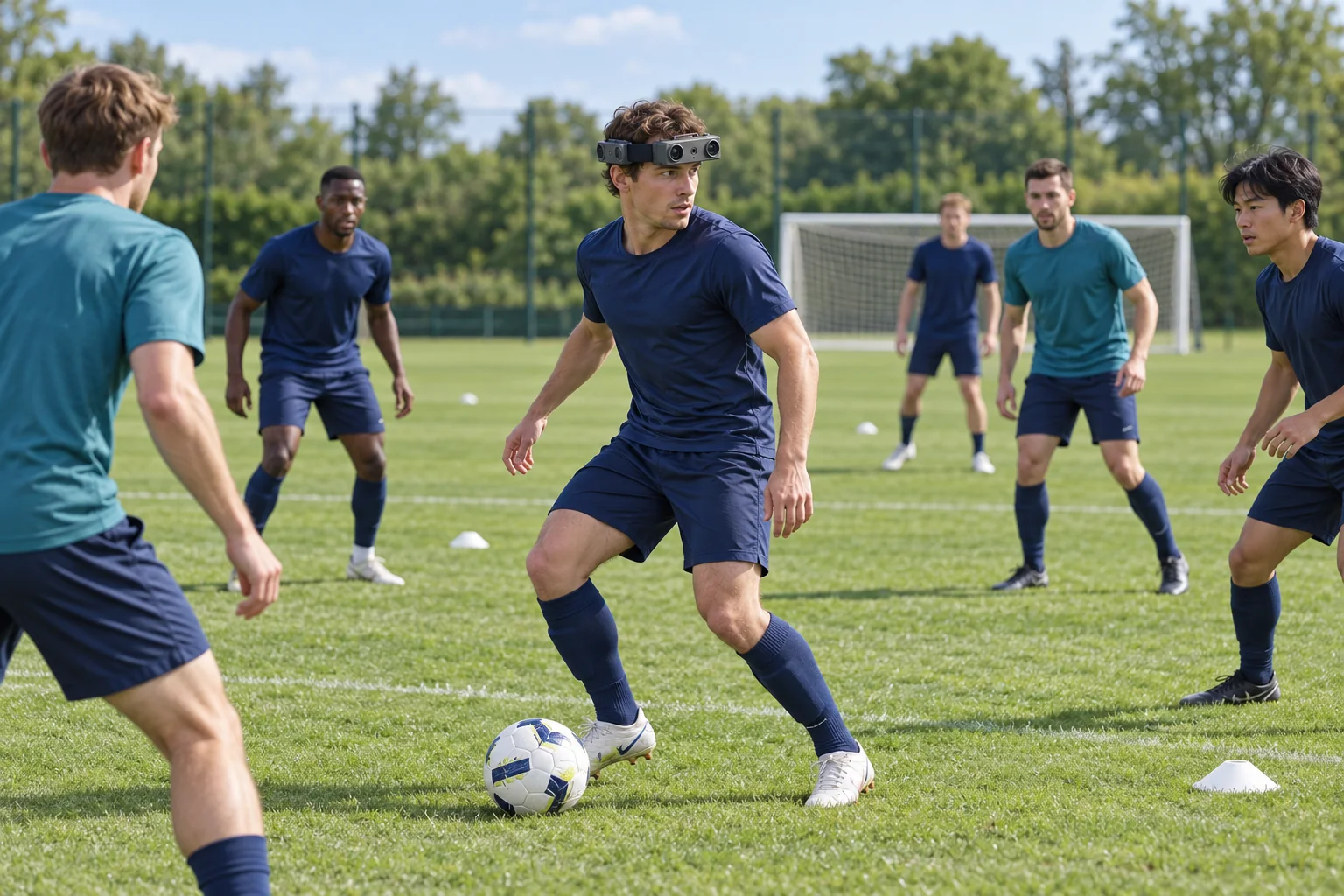
How can R10 record movement during group football practice?
- The proposed session records a participant’s perspective during a coach-led, unopposed passing exercise with several players.
- R10 specifies 1600 × 1200 at 30 fps, with camera views synchronized to a common hardware trigger or shutter signal.
- A configured 6-axis IMU can provide 100 / 200 / 500 Hz motion data from the worn unit.
- Coaches or researchers manually select and label the recorded actions; wearing roles can rotate between recording blocks.
Review EGO R10 specifications and the supplied parameter tables
Human movement on a football pitch involves the player receiving the ball and the teammates moving around that player. EGO R10 is a wearable multi-camera headband with hardware-synchronized camera views and configurable inertial sensing. This guide proposes using one R10 headband during a coach-led, unopposed group passing exercise to record the wearer’s perspective, visible teammate movement and the sequence around receiving and releasing the ball.
Base the session on documented football practice
FIFA Training Centre’s May 2026 guide to developing central midfielders describes receiving on the move, changing body orientation and connecting with moving teammates. Its exercises include a receiving player passing toward teammates positioned to either side. This documented training setting provides the basis for the proposed R10 recording session: several people participating in one passing activity on a football pitch.
Record the receiver within the group activity
Choose the receiving player as the R10 wearer for the first recording. The coach can select a short sequence in which that player moves into position, receives a ground pass, turns toward a teammate and passes onward. Note the wearer, participant roles and exercise identifier before starting. Begin recording before the incoming pass and retain the continuation afterwards, so the review includes the movement around the ball as well as the receiving action.
Check the views at the exercise’s working distance
R10 specifies fixed-focus imaging with a horizontal field of view of 115° and a vertical field of view of 80°. Check sample footage from the player’s normal head position as they face the passer and turn toward the next teammate. Review which camera views contain the ball, nearby players and pitch markings at the exercise’s actual spacing. Use this check to establish the wearing position and the views needed for the session.
Keep the R10 camera views synchronized
Within the R10 camera system, all cameras share a common hardware trigger or shutter signal. Keep the corresponding camera recordings and their identities together. During a turn, the incoming passer may appear in one view while a teammate offering the next pass appears in another. Reviewing the available views at the same recorded moment can place a visible movement within the surrounding passing activity. The reviewer selects the views containing the relevant players and ball.
Review receiving and passing sequences at 30 fps
The supplied R10 imaging specification lists 1600 × 1200 resolution at 30 fps. Review the trial recording at its original dimensions while the player receives, turns and passes. Select excerpts according to the actions that are visible at the chosen working distance. Retain each excerpt’s camera identity and frame interval with the original files, giving the coach a direct route back to the surrounding sequence when discussing a player’s movement.
Retain inertial data from the configured unit
R10’s system table specifies a 6-axis IMU in head and wrist units where required, with 100, 200 or 500 Hz sampling. For a configured head-unit IMU, retain its motion-data files with the same recording identifier as the camera files, and document the selected rate and unit location. This adds the worn unit’s inertial measurements to the material collected as the receiver turns and changes position during the exercise.
Document the pitch lighting and image mode
Outdoor capture settings belong in the football session record. R10 lists a dynamic range of 61.56 dB in linear mode and 91.56 dB in HDR mode, plus automatic exposure and white-balance controls. Review a short sample under the pitch lighting used for the exercise, including any sunlit and shaded areas in the selected views. Record the image mode and settings so reviewers know the configuration used for each recording.
Prepare video output and external power
R10 provides USB 2.0 and lists MJPG, H.264 and H.265 output formats. Prepare the recording arrangement and check a saved sample in the project’s playback workflow before the group begins. The system requires an external battery, with a specified DC 5 V supply and maximum working current of 320 mA. Plan the external power and cable placement around the wearer’s movement, and retain that setup information in the recording notes.
Organize visible interactions with human annotations
After collection, the coach or researcher can manually label visible events such as the incoming pass, the receiving action, a turn and the onward pass. Add participant identifiers and the camera view used for each observation. Review a teammate’s movement in the footage immediately before and after the selected event. These human annotations organize the R10 recordings into a record of interactions that the group can revisit during discussion of the exercise.
Build recordings around participant roles
For another participant’s perspective, rotate the R10 wearing role between recording blocks and give each block its own identifier. Keep the exercise description, wearer identity, camera files and configured IMU files together. This proposed collection method builds a set of participant-specific records of the group activity. A final sample review with the coach can establish which visible actions and views are useful before planning additional recording blocks with the EGO product team.
Application reference and R10 specifications
FIFA Training Centre — Developing central midfielders: Individual actions (12 May 2026)
Review EGO R10 specifications and the supplied parameter tables