
Robot Learning / Bimanual Object Handover / Original EGO R9 application guide; EgoMI shelf-search and handover research / Oct 21, 2026
Multi-View Egocentric Camera Research: Handovers with R9
Plan a multi-view egocentric camera study with R9: record shelf-to-hand-to-basket transfers using 1080P global-shutter video and timestamped review.
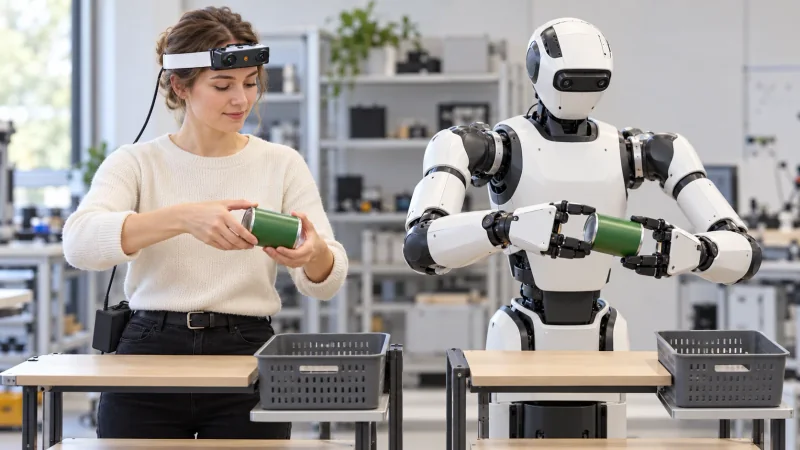
How can R9 record a shelf-to-hand-to-basket handover?
- Plan one R9 take around shelf pickup, transfer between hands and basket placement, keeping the successive wearer viewpoints in order.
- Use the documented 1080P, 30 FPS global-shutter profile and adjust the 120° camera view around the handover area.
- Reference researcher-created contact and release labels to R9 global timestamps; retain the configured six-axis IMU setting with the take.
- Researchers organize human recordings and robot trials by corresponding action phases and separate trial identifiers.
A multi-view egocentric camera study needs a clearly defined action to follow as the wearer changes viewpoint. Passing a can from one hand to the other provides that focus: the recording moves from the source shelf to the receiving hand and then to the destination basket. EGO R9 supplies a head-worn, dual-lens design, standard 1080P video at 30 FPS and global-shutter imaging. This guide develops a proposed R9 recording plan for reviewing the visible transfer of support between two hands.
Research basis: a documented object-handover task
The application is grounded in Yu and colleagues' EgoMI research. Its shelf-search task includes locating cans, grasping a selected can, transferring it between grippers and placing it into a shopping basket. The paper describes human demonstration collection and robot evaluation. Those documented actions motivate the R9 scene here. The capture team specifies its R9 session, while researchers prepare annotations, learning experiments and corresponding robot trials. The study's task description supplies the application basis; the R9 manufacturer document supplies the product specifications.
Define the R9 shelf-to-basket recording sequence
Start the R9 session with a small shelf, a clearly identified can and a basket at the intended destination. Define one sequence: look toward the selected shelf position, retrieve the can, bring it into the handover area, transfer it to the other hand and place it in the basket. Record the initial shelf position, acting hand and basket position with the take. A complete recording should retain the approach and the placement as context for the central handover.
Frame both hands through the changing R9 viewpoints
R9's 120° wide-angle lens and adjustable camera angle are relevant when both hands converge near the body. Set the wearing angle using a short rehearsal with the can at the shelf, between the hands and above the basket. Review whether the fingers around the can and the receiving hand are visible at those positions. Organize the successive shelf-facing, handover-facing and basket-facing views as segments within that take, preserving their original temporal order and the wearer's natural change of viewpoint.
Review the handover with the documented R9 video profile
Use the documented 1080P, 30 FPS profile as the stated recording configuration. The global shutter is relevant during the head turn away from the shelf and the movement of the hands toward one another. Inspect a short R9 take under the planned room lighting, concentrating on the can outline, the receiving fingers and the moment the giving hand moves away. Keep the recording mode in the session notes so reviewers know which profile produced the frames they examine.
Reference contact and release against R9 timestamps
For reviewing the handover timeline, the R9 specification lists shared-unified-clock support together with global timestamps. Reviewers can reference visible events such as shelf pickup, the receiving hand's first visible contact, the giving hand's release and basket placement against the recording timeline. Label a contact interval when the fingers cover part of the object, retaining the frames on either side for interpretation. These event labels are created by the research team and remain attached to the take identifier, the recorded timestamps and the original clip.
Keep the R9 motion-recording configuration with the take
The transition between shelf, hands and basket also includes head movement. R9's documented six-axis IMU has a sampling rate above 200 Hz. Keep the configured inertial recording details alongside the video mode and timing information when preparing a motion-aware capture session. Researchers can organize the selected video intervals and available inertial records around the same take, then choose their analysis procedure. The capture notes should identify which part of the transfer each selected interval represents.
Review corresponding human and robot transfer phases
For a human-to-robot review, choose one observable phase: the receiving hand has closed around the can while the giving hand is about to withdraw. The illustration shows a person wearing R9 and a dual-arm robot performing that same phase with separate objects in their own workspaces. Researchers schedule the robot trial and align corresponding phases for review, retaining a distinct trial identifier for each sequence. This creates a concrete review subject: pickup, shared support, release and final placement.
Organize R9 recordings for repeated demonstrations
R9 records H.265 video in an MP4 container and supports T-Flash memory cards and an external battery. Prepare the recording and power configuration for the planned repetitions, then retain the original MP4 with its shelf-position notes and timestamped handover labels. Review a sample file before collecting further takes. When the team extracts a handover segment, record its start and end references so the selected view can be traced to the complete shelf-to-basket demonstration.
Prepare a focused R9 handover-capture pilot
A focused R9 pilot asks whether the visible handover remains interpretable through the change from the shelf view to the basket view. Define the object and transfer sequence, adjust the camera angle, inspect one full recording and refine the collection notes before adding repetitions. That gives a multi-view egocentric camera project an identifiable manipulation event and a reviewable visual record. Contact the EGO Camera team to discuss the R9 recording configuration and sample footage for the planned human-demonstration collection.
Research references and confirmed R9 specifications
EgoMI research - egocentric demonstrations and shelf-search handovers