
Humanoid Robot Learning / Original EGO R8 guide; EgoVerse research reference / Sep 29, 2026
Multi-View Egocentric Data Collection for Humanoid Robot Learning with EGO R8
Plan humanoid-learning demonstrations with EGO R8 stereo views, dual global shutters, hardware synchronization, unified timestamps, IMU and calibration data.
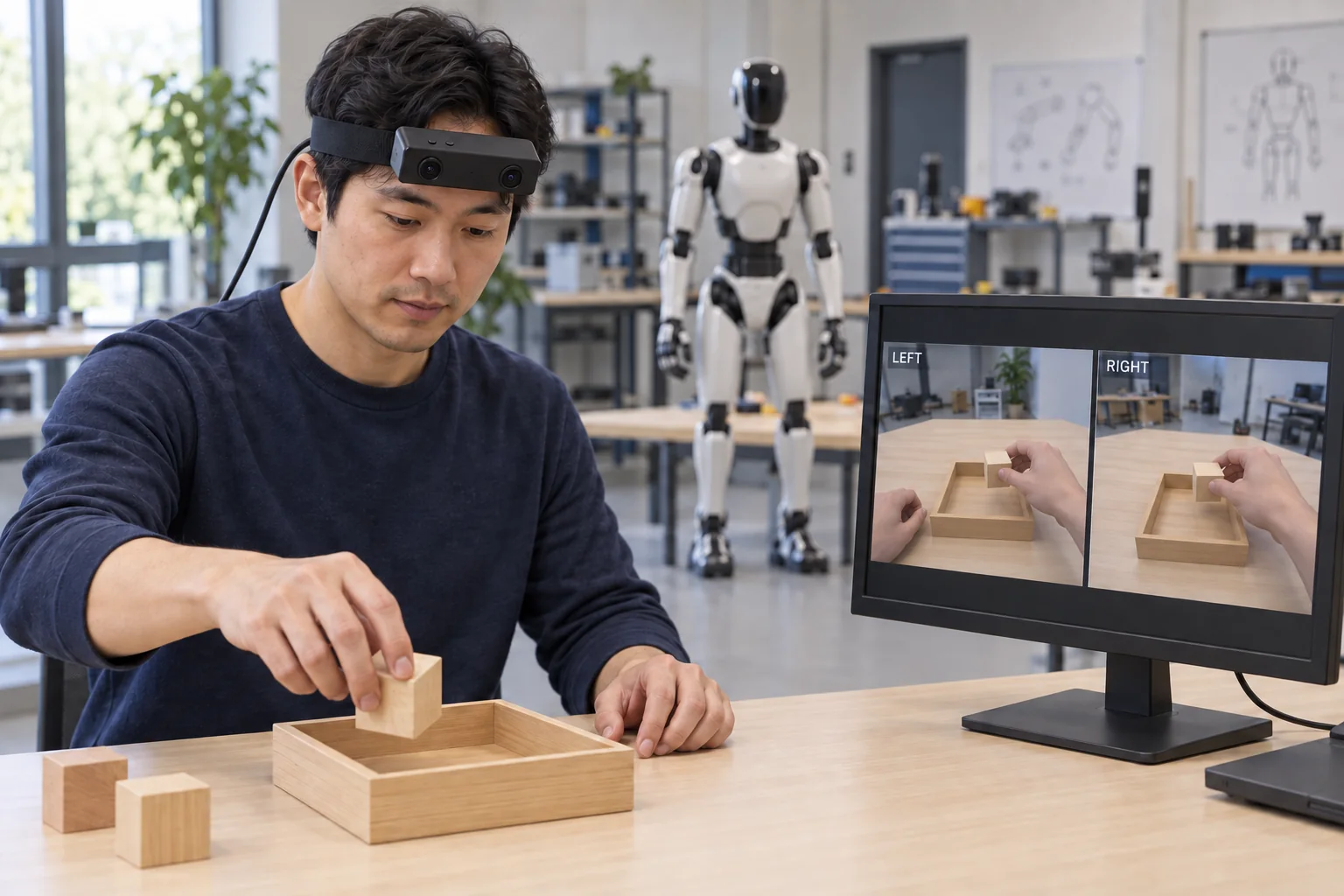
How can R8 support multi-view demonstration capture?
- R8 supplies left and right egocentric views using dual global-shutter sensors and a common hardware trigger or shutter signal.
- The documented 6-axis IMU offers 100 / 200 / 500 Hz sampling, with unified camera and IMU timestamps.
- Keep the delivered unit-specific calibration and actual USB capture mode with each recording session.
- Researchers define the manipulation task, review and annotate the recordings, and perform subsequent learning experiments.
Review EGO R8 specifications, video modes and manufacturer document
Multi-view egocentric data collection for humanoid robot learning begins with preserving what the demonstrator sees as a task unfolds. EGO R8 offers a head-mounted stereo capture setup with two global-shutter cameras, hardware synchronization and a configurable 6-axis IMU. In this guide, the two views are R8’s left and right camera images. The proposed workflow keeps those images together with timestamps, calibration and task notes for a research team’s subsequent processing.
Use a research-grounded collection protocol
EgoVerse, a 2026 study of egocentric human data for robot learning, documents shared task instructions, visible hands and objects, and records organized by demonstrator, scene and task. Its experiments include a humanoid platform. These collection principles inform the proposed R8 workflow below. The camera specifications come from the R8 manufacturer document, while the research team defines the demonstrations, annotations and learning experiments.
Define the two R8 viewpoints
For R8, multi-view collection means retaining the two spatially separated observations of the same manipulation. Keep left and right identities consistent throughout recording, export and review. A researcher examining an object placement should be able to retrieve both corresponding images and the calibration associated with that unit. This preserves the stereo input described in the manufacturer specification for subsequent stereo matching and depth-estimation work in the research pipeline.
Record a complete manipulation demonstration
Begin with a clearly defined manipulation, such as picking an object up and placing it into a container, a task documented in EgoVerse. Record the instruction and the visible beginning and end of each demonstration. With R8 fitted above the operator’s eyes, review a short sample to check that the reaching hand, object and destination remain visible through the action. Retain the complete original recordings when selecting individual episodes.
Preserve image geometry with dual global shutters
R8 uses two global-shutter image sensors. Within each image, pixels expose simultaneously, preserving the documented capture geometry as the wearer turns the head or moves a hand through the workspace. For an object-placement session, review frames around the reach, grasp and release at the chosen settings. Record those settings with the sequence so researchers can interpret the visual observations in the context of the actual acquisition configuration.
Keep hardware-synchronized stereo observations together
The R8 specification describes a common hardware trigger or shutter signal for camera synchronization. Preserve the corresponding left and right frames as one stereo observation during export. Alongside the images, retain their original timestamps and frame identifiers in the session record. This connects the hardware synchronization feature to a practical dataset requirement: a reviewer or processing script can locate the two views belonging to the same recorded instant.
Associate calibration with the recorded camera unit
The manufacturer describes unit-specific factory calibration, including camera intrinsic parameters, distortion coefficients and stereo extrinsic parameters where applicable. Associate the delivered file with the R8 unit identifier and the recorded video mode. Researchers using the stereo images for rectification or geometric processing can then retrieve the relevant parameters. Store the original calibration file and document any image resizing or cropping applied during later processing, keeping the original images available for reference.
Retain visual and inertial samples on the documented time base
R8 provides a 6-axis IMU with selectable 100, 200 or 500 Hz sampling, and the document specifies unified hardware timestamps for camera frames and IMU samples. Choose and record the IMU rate for the collection session, then retain the inertial samples and their timestamps with the stereo recordings. This provides temporally referenced visual and inertial inputs for the team’s processing. During export review, check timestamp ordering and file continuity in the saved sample.
Check hand and object framing in both images
The fixed-focus R8 optics have a listed horizontal field of view of 115° and vertical field of view of 80°. Check the two images at the demonstrator’s normal working posture, including the nearest grasp and the final placement. Use the pilot recording to set a repeatable wearing position and document it in the session notes. Review framing again when changing the workstation arrangement or the person wearing the unit.
Specify the delivered USB video mode
The R8 manufacturer’s main table lists 1600 × 1200 at 30 fps. Its separate USB mode table lists MJPG 1920 × 1080 at 30 fps, YUY2 1920 × 1080 at 15 fps, and 1280 × 720 at 30 fps in both formats. The main table lists H.264/H.265, while the USB table lists MJPG/YUY2; confirm the delivered resolution, encoding and simultaneous stereo-stream configuration for the selected mode. Keep the actual format and frame rate in each session record.
Prepare the recording connection and software
R8 connects over USB 2.0 and specifies a DC 5 V supply with a maximum working current of 320 mA. Prepare the recording host, connection and power arrangement before the demonstration. The manufacturer lists SDK/API delivery for integration; use the delivered interfaces to organize the camera and inertial data in the project’s capture software. Save a short test sequence and inspect its images, timestamps and associated files before starting the planned collection.
Build traceable episodes for the research pipeline
Organize each R8 episode around the original stereo recordings, timestamps, configured IMU data, calibration-file reference and capture settings. Add the task instruction and manually reviewed action intervals, such as reaching, lifting and placing. Keep the image-processing history with derived files. In a humanoid-learning project, the research team then handles dataset conversion, training and evaluation against its defined task. The R8 material remains traceable to the original human demonstration throughout that workflow.
Plan the first R8 collection batch
A useful first R8 collection batch starts with a documented task, a checked stereo configuration and an agreed recording format. Review the saved left and right views, IMU samples and calibration association before expanding the session. Share the selected video mode, IMU rate and required SDK/API and calibration deliverables with the EGO team when planning the hardware configuration. This gives the humanoid-learning researchers an explicit record of how their egocentric observations were acquired.
Research reference and R8 specifications
EgoVerse — An Egocentric Human Dataset for Robot Learning from Around the World (2026)
Review EGO R8 specifications, video modes and manufacturer document