
Salon Facial Workflow Capture / VTCT Skills: Facial Treatments / Nov 18, 2026
From Cleansing to Finish: Recording Facial Care with R8
Record a salon facial with the R8 global shutter stereo camera: follow cleansing, two-handed facial techniques and finishing care with synchronized capture.
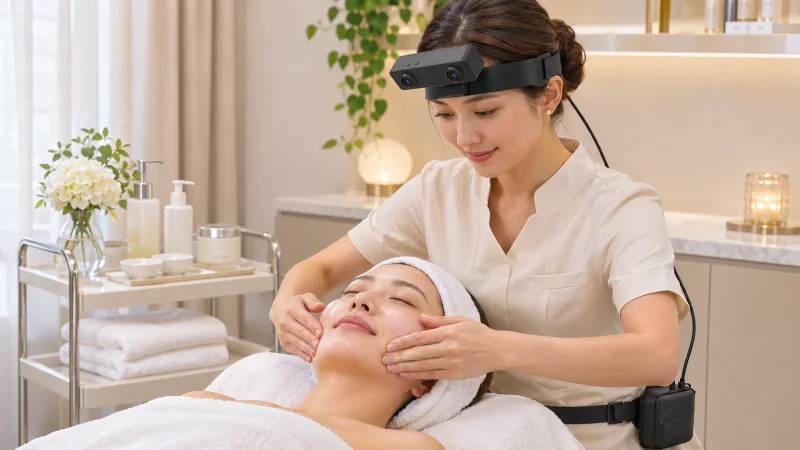
How can a global shutter stereo camera document a salon facial?
- Follow the consultant through cleansing, product changes, two-handed facial movements, mask application and finishing care.
- Capture the working area with R8 hardware-synchronized global-shutter stereo views and a selectable 100, 200 or 500 Hz 6-axis IMU stream.
- Use unified timestamps to create reviewer-written chapters for each facial-care stage and its transitions.
Explore EGO R8 stereo, hardware synchronization and IMU specifications
A global shutter stereo camera can document the beauty consultant's view as a salon facial moves from cleansing to the final skincare application. Worn on the consultant's forehead, EGO R8 captures two hardware-synchronized views of the working area, with 6-axis IMU samples and unified timestamps. This capture plan follows a complete facial-care demonstration, retaining the hand movements and the transitions between treatment stages for a trainer's later review.
Plan a complete facial-care recording
VTCT Skills' beauty therapist assessment guide identifies cleansing, toning, exfoliation, massage, mask and moisturising as components of a facial treatment. Those stages provide an outline for the recording session. The consultant selects and performs the client's agreed salon routine; the R8 recording follows that routine in its actual order. A session note names the products and stages chosen for this particular demonstration.
Fit R8 for the consultant's working posture
With the client reclined face up and the hair held away from the face, fit the R8 black headband at the consultant's normal working position. Rehearse a reach to the trolley, a return to the forehead and a two-handed movement across the cheeks. Check both camera views for the fingertips, facial working area and product handover. Set the framing while the consultant adopts the posture used during the service.
Connect R8 by USB 2.0 to the external capture host and arrange its DC 5 V supply. Lead the cable behind the shoulder to the selected waist-carried setup, leaving the consultant's arms free for the demonstrated movements. Before the first cleanse, confirm that both image streams are arriving, choose the IMU sampling rate and note the device identifier with the session settings.
Start with cleansing and retain product changes
Begin the take before the consultant collects cleanser. Retain the product transfer, contact with the face and the removal movements, including the return to the trolley for fresh pads or a cloth. When the consultant moves from one cheek to the other, keep the intervening hand change in the recording. This gives the reviewer the approach and completion of each cleansing pass rather than isolated contact frames.
Continue through the toning and exfoliation stages included in the agreed routine. Follow the applicator or fingertips from the product container to the working area, then retain the removal and preparation for the next stage. R8's two camera positions provide paired views of these visible actions. Check the recorded transition where the consultant puts an item down and brings both hands back to the face.
Follow both hands through the facial sequence
During facial massage, retain the full hand sequence across the forehead, cheeks and jaw area as demonstrated by the consultant. Include bilateral strokes, alternating movements and the moment the hands reposition for the next part of the face. R8's hardware trigger or shutter signal coordinates its two global-shutter image streams. Review the corresponding pairs as the fingers change position.
Use the original frame timing when selecting the start of a cheek stroke or the transition into a forehead movement. In a global shutter stereo camera recording, the paired viewpoints keep each visible hand arrangement associated with its capture time. The trainer can inspect successive pairs to describe the movement order, including which hand leads a transition and where the next contact begins.
Continue through mask removal and finishing care
Keep recording when the massage medium is removed and the mask is prepared, applied and later taken away. Preserve the application and removal boundaries, with any waiting interval identified in the session notes. Finish the take after the consultant applies the selected finishing skincare and clears the working area. The full recording then connects the hands-on stages with their preparation and completion.
Keep head movements on the session timeline
R8 offers IMU sampling settings of 100, 200 and 500 Hz for its six-axis inertial record. Save the session's selected rate. The consultant's looks toward the trolley and back to the client change the head-mounted viewpoint. Unified timestamps connect the corresponding camera and inertial records, letting the reviewer retrieve the part of the session around a product reach or a return to two-handed facial work.
Create facial-care chapters during human review
At review, create a facial-care chapter list with stage name, start time, end time and working area. Add notes such as cleanser collected, first cheek contact, hands return to forehead, mask application begins and finishing product put aside. These chapter names and observations are written by the reviewer. Retain the original stereo images and IMU records with the notes and the R8 unit's applicable calibration information.
What does a global shutter stereo camera capture during a facial?
For a salon facial, the R8 global shutter stereo camera supplies synchronized left and right images from the consultant's head-mounted position. Its 6-axis IMU and unified timestamps keep the device's inertial record associated with the image sequence. A trainer uses those files to review the visible hand placements and the progression of the demonstrated service.
How can the complete facial routine stay easy to review?
Record from the first product collection through the final application, including changes of applicator, movement between facial areas and mask removal. Keep a chapter list alongside the complete session. That arrangement lets a trainer open a specific two-handed movement while retaining the surrounding preparation and the next step in the facial routine.
How should the facial recording and IMU data be kept together?
Choose the R8 IMU rate in the acquisition setup and save it in the session note. A reviewer can then locate a camera interval and its accompanying inertial samples on the unified timeline, for example when the consultant turns from the trolley to resume a cheek movement. Keep that interval linked to the original take and the reviewer-written stage description.
Facial-care reference and R8 specifications
VTCT Skills: Beauty Therapist assessment guide, facial treatments (page 28)
Explore EGO R8 stereo, hardware synchronization and IMU specifications