
Foot Massage Workflow Capture / Sense: Foot Massage Guide / Nov 19, 2026
Recording a Heel-to-Toe Foot Massage Session with R8
Use an R8 stereo camera with IMU to record a foot massage: retain heel support, sole work, toe movements and the change between feet on one timeline.
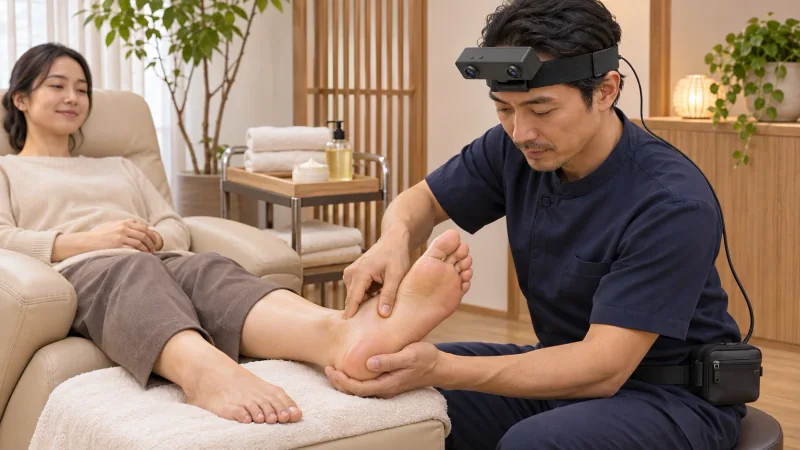
How can a stereo camera with IMU document a complete foot-massage session?
- Keep heel support, sole work, toe handling and the transition between feet within the same session reference.
- Use R8 hardware-triggered global-shutter stereo views with a six-axis IMU set to 100, 200 or 500 Hz.
- Have a trainer use unified timestamps to select review intervals and write foot-side and hand-transition notes.
Explore EGO R8 stereo, synchronization and IMU specifications
R8 gives a foot-massage practitioner a stereo camera with IMU for documenting the service from the working head position. Its paired global-shutter views record the visible foot and hands, while a six-axis inertial stream accompanies movement of the headset. This session plan follows both feet from the first supported hold through the final release, keeping the transitions available for a trainer to examine alongside the demonstrated hand techniques.
Define the landmarks of the foot-massage take
Sense's published foot-massage guide describes supporting the foot, applying a massage medium, working with palms and thumbs, handling the toes and finishing with a two-handed hold before repeating on the other foot. That sequence supplies practical landmarks for this recording plan. The professional practitioner determines the routine for the session; the filming team uses those visible landmarks to organise its review.
Frame the supported foot from the working seat
Seat the practitioner at the foot end of the reclining client and fit the black R8 headband before the session begins. Bring the supported heel into the normal working position and rehearse a hand change near the forefoot. Inspect the left and right previews for both hands, the underside of the foot and the edge of the towel. Check this framing again when the practitioner changes their seated posture.
Prepare the external capture host with the R8 USB 2.0 connection and specified DC 5 V supply. Arrange the cable behind the practitioner's shoulder toward the chosen waist-carried setup. Confirm reception of the two camera streams, then give the take a session identifier and note which foot will be demonstrated first. Start acquisition before the practitioner picks up the selected cream or oil.
Follow the first hold and medium application
Retain the moment the practitioner supports the heel and distributes the medium. Follow the working hand from the container back to the foot, including the initial palmar passes that establish the start of the routine. The supporting hand may shift as the foot is presented toward the practitioner. Keep that shift with the following movement so a viewer can see how the working surface was made accessible.
Retain the heel-to-forefoot hand transitions
Continue across the sole as the practitioner progresses through the chosen heel, arch and forefoot work. Keep the approach, contact and withdrawal of each demonstrated movement in order. Include transitions from broad hand contact to more local thumb work and the repositioning around the base of the toes. R8's stereo pair preserves the two camera viewpoints of those changing arrangements throughout the take.
Keep corresponding stereo views together
R8 coordinates its image sensors through a shared hardware trigger or shutter signal. Both sensors use a global shutter, exposing their pixels together within each image. During alternating thumb movements, retain the corresponding image pairs on their original timeline. A trainer can then step through the same hand arrangement in the left and right records rather than joining separately selected moments.
Continue through the toes and the second foot
Record the handling of individual toes as part of the practitioner's selected routine, then retain the finishing hold. When the first foot returns to its support and the next foot is brought forward, keep the towel adjustment and the new supporting grip in the take. Identify the side change in the session notes. Follow the second foot through its complete demonstrated sequence and finish after the final supported release.
Associate viewpoint changes with inertial samples
For the inertial channel, choose one of R8's three available sampling rates: 100 Hz, 200 Hz or 500 Hz. Save that selection with the take. Looking down to the supported foot, reaching toward the product tray and returning to the sole changes the headset's orientation. The unified camera and IMU timestamps let the reviewer retrieve the images and inertial interval around each such viewpoint change.
Create a foot-side review sheet
Build a review sheet with a foot-side field, the visible working area and a pair of time boundaries for each selected segment. Useful entries include medium reaches the sole, support transfers between hands, thumb work approaches the forefoot, toe handling begins and the first foot is set down. These entries are written by the reviewing team after inspecting the paired images. Keep them beside the complete session files.
What does a stereo camera with IMU capture during foot massage?
The R8 stereo camera with IMU records the practitioner's two image streams and the headset's six-axis inertial samples with unified timing. In this foot-massage setup, those files let a trainer examine the sequence of visible holds, hand repositioning and sole movements from the wearer's perspective. The trainer chooses the section boundaries and adds the descriptions used in the teaching review.
Which transitions belong in the complete session recording?
Begin before the initial product reach and retain the handover from the first foot to the second. Save a continuous session reference along with any shorter selections. A clip of forefoot work is easier to interpret when its preceding supporting grip and the next toe movement remain available through the same session identifier.
How should a reviewer connect the foot-side notes and IMU record?
Store the selected inertial rate and capture settings with the session record. When reviewing a transition between feet, use its timestamp interval to select the accompanying camera frames and IMU samples. The reviewer can add a foot-side label and a short note about the change in working position, keeping those observations associated with the original recording.
Foot-massage reference and R8 specifications
Sense: How to give a foot massage, within its massage guidance
Explore EGO R8 stereo, synchronization and IMU specifications