
SLAM Research / Visual-Inertial Capture / Original EGO R9 application guide; UMA-VI research / Oct 29, 2026
SLAM Dataset Collection: Low-Texture Passages with R9
Plan SLAM dataset collection with EGO R9 for low-texture indoor passages using 1080P global-shutter video and timestamped inertial data.
How can R9 support SLAM dataset collection in a low-texture passage?
- Record an indoor passage with R9 1080P global-shutter video at 30 FPS.
- Keep six-axis IMU observations and shared-clock timing references with each session.
- Identify plain and repetitive-surface intervals and retain the original recordings.
- Researchers prepare section labels, SLAM analysis, code and separate robot trials.
SLAM dataset collection benefits from recordings that preserve both motion and what was visible as the wearer moved. A plain wall or a row of similar panels provides a focused indoor challenge: the view changes while much of the surface looks alike. EGO R9 records head-mounted 1080P global-shutter video at 30 FPS and provides six-axis inertial sensing with shared-clock and global-timestamp support. A research team can organize those observations into passages for visual-inertial SLAM evaluation.
Research basis: few distinctive visual features
The University of Málaga's UMA-VI dataset examines visual-inertial motion estimation in indoor environments with few distinctive features or repetitive textures. Its documented sequences include corridors and other building spaces. This guide adapts that research question to a proposed R9 collection along a low-texture passage. The team defines the recording protocol and conducts the subsequent analysis; R9 specifications here are taken from the manufacturer document and current product page.
Define a low-texture passage
Choose a passage with a plain surface and a section of repeated panels. Give the passage and each section a short identifier. Record the starting position, walking direction and the locations of visible transitions such as the beginning and end of the panelled area. Ask the R9 wearer to walk through the section at an agreed pace while keeping the intended surface in view. Keep each take as a continuous observation so a reviewer can see how the view changes across the passage.
Frame the wall and the space ahead
R9's adjustable camera angle and 120° wide-angle lens help the team frame the nearby wall and the space ahead. Review a rehearsal at the entry, middle and end of the section, including a natural head turn. Check the saved video for the visual cues actually present, such as panel edges and boundaries with the floor or doorway. Record the chosen angle and section identifiers with the session so that the view can be interpreted during review.
Review the R9 video by passage section
The specified 1080P video mode runs at 30 FPS, and R9 uses a global shutter. Preserve the complete recording and mark the frames where the plain surface begins, repeating panels dominate the view and the passage ends. A reviewer can inspect these intervals alongside the wearer's motion instead of relying on a single representative image. For repeated passes, retain the same section names and create a new take identifier for each recording.
Associate inertial observations with the visual interval
R9's six-axis IMU is specified at a sampling rate above 200 Hz. The supported shared unified clock and global timestamps provide a timing basis for associating camera and inertial observations. Keep the timing information delivered with the session and identify the intervals selected for visual review. Researchers can then examine head movement during the same passage segment, retaining the original records and their timing references alongside any extracted clips.
Create a session sheet for each take
Organize the R9 collection with a session sheet: unit identifier, selected video mode, IMU sampling specification, recording identifiers, camera angle and section descriptions. The manufacturer lists camera-intrinsics support; associate the supplied camera information with the relevant unit. Researchers can note the length of each selected interval and describe where repetitive panels or broad plain surfaces appear. These annotations are research-team work and remain linked to the original recording.
Prepare passage intervals for SLAM analysis
Review the passage as a set of related observations. The beginning and end provide context for a section dominated by similar-looking surfaces; a natural head turn changes the viewed portion of the wall. Researchers may choose corresponding image and inertial intervals, prepare inputs for their own SLAM methods and compare their results across separately identified takes. Retain the original take when sharing a shorter research clip so its surrounding visual context remains available.
Compare corresponding human and robot walking phases
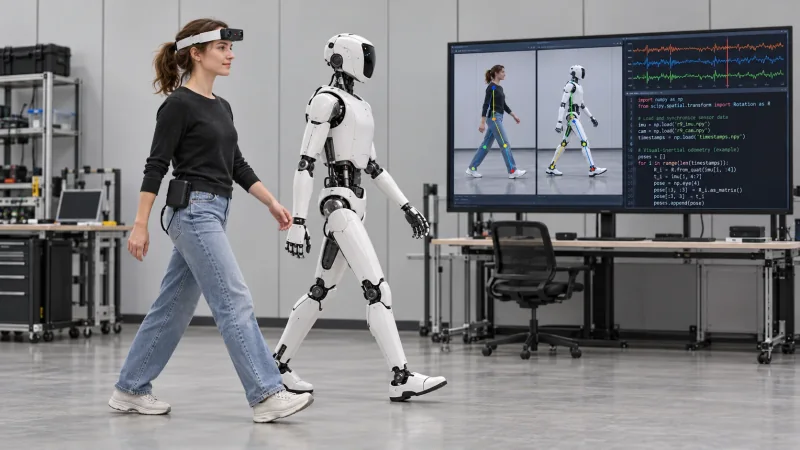
The laboratory can also arrange a separate humanoid-robot walking trial along the same type of passage. Researchers select comparable movement phases and review those recordings alongside the R9 human demonstration as part of their study. The illustration presents a person and robot in matching walking phases, with example code and a visual-inertial timeline on a laboratory monitor. The paired trial, code and analysis are prepared by the research team.
Keep the original recording package together
For recording sessions, the R9 specification lists H.265 encoding in MP4, T-Flash storage and external battery support. Prepare the storage and power arrangement before collecting a take, then inspect a saved passage from beginning to end. Keep the original video, available inertial and timing records, unit information and section notes together. This SLAM dataset collection makes the low-texture interval identifiable and reviewable for a team's subsequent research.