
Thai Massage Skill Capture / Original EGO R8 recording guide informed by published Nuad Thai teaching methods and manufacturer specifications / Nov 12, 2026
Stereo Egocentric Camera: Thai Massage Capture with R8
Record a Thai massage demonstration with the R8 stereo egocentric camera: paired global-shutter views, a 6-axis IMU and time-linked session review.
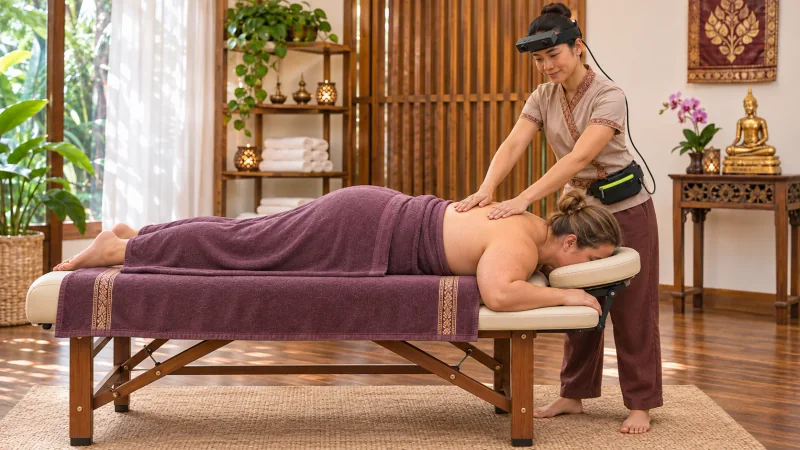
How can a stereo egocentric camera record a Thai massage demonstration?
- Fit R8 on the practitioner and check the working hands and contact area in the actual table-side massage postures.
- Keep the hardware-synchronized global-shutter stereo frames with the selected-rate 6-axis IMU record and unified timestamps.
- Preserve the complete demonstration and let an instructor index hand placements, working-area changes and position transitions.
A stereo egocentric camera can document Thai massage from the viewpoint of the practitioner performing the session. EGO R8 combines two global-shutter cameras, common hardware synchronization and a 6-axis IMU with unified timestamps. This guide describes an R8 recording workflow that follows a practitioner from the first demonstrated hand placement through changes of working position to the final release, keeping the complete demonstration together for later review.
Plan a complete practitioner-view recording
Nuad Thai School describes a teaching process built around precise demonstration, guided repetition, correction and treatment sequencing, with video materials available for later study. Those published teaching stages inform the recording plan here. The practitioner follows the routine selected for the demonstration; R8 supplies the first-person image and head-mounted inertial records, and an instructor or reviewer prepares the session notes.
Fit R8 and check the working view
Begin by fitting the R8 headband and centering the stereo module on the forehead. Check its position while the practitioner adopts the actual standing and leaning postures used beside the massage table. A short preview should include both working hands and the current contact area. Repeat that framing check when the practitioner changes sides or looks toward a different part of the demonstrated sequence.
Connect the recording arrangement through the documented R8 USB 2.0 interface and DC 5 V supply. Route the cable toward the chosen external capture and power arrangement before beginning the demonstration. Check the stereo image feeds at the capture host, select the acquisition settings and record the device identifier. Keep the same arrangement in place while rehearsing the movements that take the practitioner around the table.
Record the routine from first contact to final release
Start the recording before the first demonstrated movement. Give the take a session identifier and note the routine being followed. Retain the initial approach, the visible hand placements, the transitions between working areas and the final hands-off interval. These surrounding moments show how one part of the massage connects to the next, rather than leaving a set of isolated contact moments.
Keep stereo views of each movement synchronized
During a two-handed movement, one hand may establish its position while the other changes placement. R8 uses a common hardware trigger or shutter signal to synchronize its two global-shutter cameras. Preserve the corresponding left and right frames together when reviewing these visible changes. The paired views retain the same capture instant as the practitioner moves from one hand arrangement to the following action.
Continue recording when the practitioner shifts alongside the table or the recipient changes position within the selected routine. Preserve the preparation for the next movement, its visible execution and the transition out of it. The R8 viewpoint follows the practitioner through that progression. During review, the instructor can name the working area and identify which hand arrangement belongs to each phase of the demonstration.
Retain head-motion data with the changing view
R8 offers selectable 100, 200 or 500 Hz sampling for its 6-axis IMU. Choose the rate for the session and retain that setting with the recorded samples. As the practitioner looks down at the working area or turns toward the next position, the head-mounted inertial record accompanies the changing viewpoint. R8 unified timestamps provide the time reference connecting those samples with the camera frames.
Index the visible massage phases
Build the session index from events visible in the recordings: first hand placement, a hand repositioned, movement to another working area, a recipient-position transition and final release. A reviewer assigns the labels and their start and end times. Use the R8 timestamps to locate the corresponding stereo frames and IMU interval, while keeping the complete take as the reference for each extracted teaching segment.
Retain calibration and session settings
Keep the applicable R8 calibration information with the session configuration. The documented calibration support covers camera intrinsic parameters, distortion coefficients and stereo extrinsics where applicable. Associate those files with the correct device and capture setting. Store the selected IMU rate, session identifier and original timing information alongside the paired image records so the collection can be revisited consistently.
Review and archive the complete take
At the end, review the opening, several hand-placement changes, each selected position transition and the closing interval in both image records. Confirm that the session index points to the intended visible actions and corresponding inertial samples. Retain the original recording files, calibration information and instructor-written notes together. This gives the team a structured record of the demonstrated massage sequence from preparation through completion.
What does R8 record during a Thai massage demonstration?
R8 provides synchronized left and right global-shutter images from the practitioner's head-mounted viewpoint. Its 6-axis IMU and unified timestamps add a corresponding head-motion record. Together, these documented features support a time-indexed visual record of the hand placements and transitions visible during a Thai massage demonstration.
How should the full sequence be kept together?
Begin before the first movement and finish after the last release, preserving the routine in its performed order. Use a single session identifier to associate the original recordings with the instructor's phase notes. Keep the connecting movements in the take when preparing shorter review clips.
Which R8 files and settings belong in the session archive?
Keep the paired images, IMU samples, selected 100, 200 or 500 Hz rate, unified timestamps, device identifier and applicable calibration information together. The reviewer adds the routine description and event index. This organizes stereo egocentric camera recordings around the actual Thai massage demonstration being studied.
Teaching reference and R8 specifications
Nuad Thai School: demonstration, guided practice, sequencing and video review