
Robot Learning / Human Demonstrations / Original EGO R10 application guide; RoboTube research / Oct 28, 2026
Synchronized Human Demonstration Data: Pot Lifting with R10
Use EGO R10 synchronized human demonstration data to study two-handed pot lifting, from handle contact to placement, for robot learning.
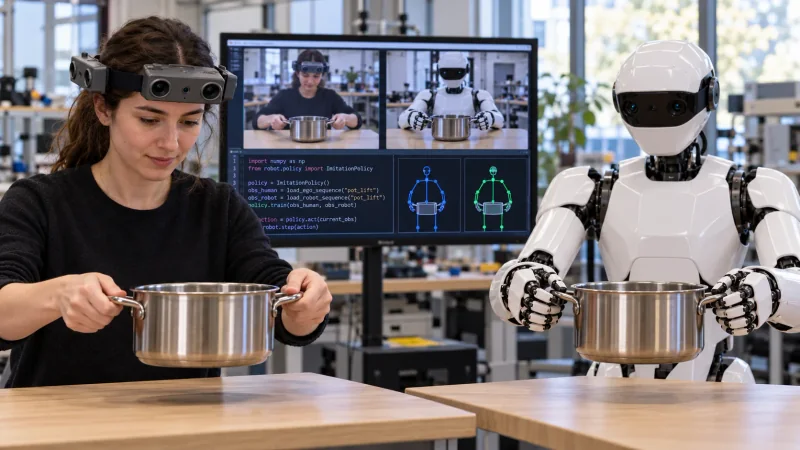
How can R10 support synchronized human demonstration data?
- Capture the approach, two-handle grasp, lift, transfer and placement as a complete R10 demonstration.
- Review multiple camera observations synchronized by a common hardware trigger or shutter signal.
- Keep the selected head or wrist IMU configuration and sampling rate with the session where applicable.
- Researchers prepare event labels, corresponding robot trials and the inputs used in their study.
Synchronized human demonstration data can help a research team study how two hands coordinate around an object. In a pot-lifting exercise, the demonstrator reaches for both handles, lifts the pot, moves it and places it on a marked surface. EGO R10 provides head-mounted multi-camera observations of this sequence, with all cameras synchronized to a common hardware trigger or shutter signal. Researchers can organize the resulting views around the same visible phases for robot-learning studies.
Research basis: bimanual pot lifting
RoboTube research presents human video demonstrations for robot manipulation, including a bimanual pot-lifting task illustrated in its paper. That published task motivates the proposed R10 collection described here. The researchers in this workflow decide the task setup, organize the recorded observations, add labels and prepare separate robot trials. The R10 characteristics described below come from the manufacturer's tables and the current R10 product page.
Plan the demonstration and visible phases
Place an empty pot with two handles on a stable work surface and identify a destination area on the same surface. Record the initial pot position and the starting positions of both hands. A complete demonstration includes the approach, contact with each handle, lifting, the move toward the destination, placement and release. Repeated takes can use the same starting arrangement so reviewers can identify the corresponding phase in each recording.
Frame both handles and the destination
R10's fixed-focus camera specification lists a 115° horizontal and 80° vertical field of view. During setup, review the head-mounted view as both hands approach the handles and as the pot reaches the destination. The wearer's head position and the arrangement of the work area affect what is visible, so a brief rehearsal helps the team position both handles and the placement area in the intended views.
Review synchronized R10 camera observations
R10 records at a specified 1600 × 1200 resolution and 30 frames per second. Its cameras share a common hardware trigger or shutter signal. When reviewing handle contact and lift-off, the team can select observations of the same action across the synchronized camera views. Preserve the original views and their associations with the take identifier so that a reviewer can return to the full sequence surrounding each selected frame.
Label the two-handed action sequence
The two hands may reach the handles at slightly different moments. Researchers can mark left-handle contact, right-handle contact, pot lift-off, first contact at the destination and release as review events. These labels are created by the research team from the visible recording. Keeping each event tied to the take and its camera observations makes the phases easier to inspect together during dataset preparation.
Record the chosen inertial configuration
Where the selected R10 head or wrist configuration includes the six-axis IMU, the specified sampling choices are 100, 200 and 500 Hz. Record the selected configuration and sampling rate alongside the capture session. The team can review the available motion data in the context of the demonstration and retain it with the visual recordings for later analysis.
Prepare the views for spatial analysis
The R10 specification lists dual-camera calibration, ranging, depth detection and 3D reconstruction among its functions. For a study that uses these functions, plan the camera configuration around the pot and both handles, and discuss the delivered setup with the product team. Retain the relevant calibration information with the associated recording when preparing observations for spatial analysis.
Organize corresponding human and robot trials
A research team can prepare a separate robot trial using the same pot-lifting task and compare its visible phases with the human demonstration: grasp, lift, transfer and placement. The illustration shows a person and robot at corresponding phases; the monitor's example code and review panes represent researcher-prepared analysis. Matching the task phases and preparing robot-learning inputs are parts of the research workflow.
Keep the capture session together
R10 uses USB 2.0 and lists MJPG, H.264 and H.265 output formats. The system uses an external battery, with a specified DC 5 V supply and maximum working current of 320 mA. Before a session, agree on the camera and IMU configuration and check that the capture host and power connection suit the planned movement. Keep the original recordings, session identifiers, configuration notes and researcher-created event labels together as the synchronized human demonstration data collection.