
Spatial Data / Dynamic Gesture Capture / Original EGO R10 application guide; Ego-1K dynamic egocentric scene research / Oct 23, 2026
Synchronized Multi-View Spatial Data: R10 Gesture Capture
Collect synchronized multi-view spatial data with R10: 1600 × 1200 at 30 fps, shared camera triggering and a focused hand-gesture review workflow.
How can R10 collect synchronized multi-view spatial data?
- Use R10 common hardware triggering and 1600 × 1200 capture at 30 fps to record a defined swipe and head-turn sequence.
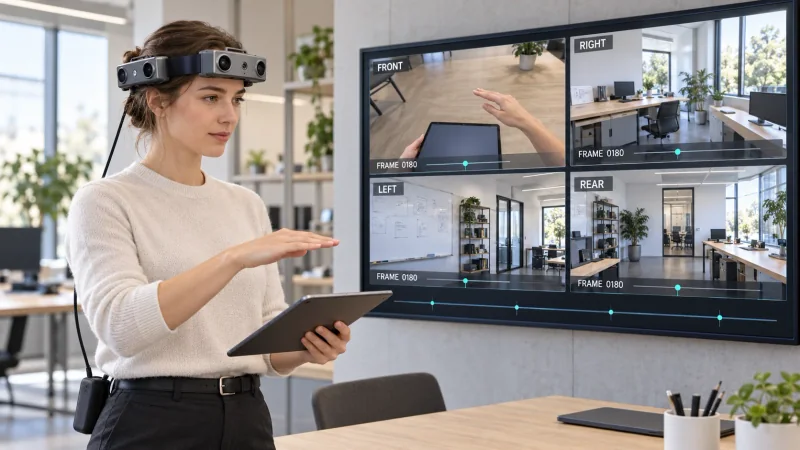
- Identify the hand-and-tablet view and the surrounding room views from the actual camera images, preserving each direction in review.
- Researchers organize the recorded views on a shared review grid and create gesture-phase and visibility labels.
- Keep the selected camera pair, calibration record, output format and configured 100 / 200 / 500 Hz IMU setting with the take.
Synchronized multi-view spatial data connects observations from several camera directions to the same changing action. For a hand-gesture study, the useful record includes the moving fingers, the object beneath them and the room seen as the wearer turns. EGO R10 combines a wearable multi-camera arrangement with a common hardware trigger/shutter signal and 1600 × 1200 imaging at 30 fps. This guide proposes an R10 collection centered on tablet-directed swipes and head turns, followed by researcher-arranged review of the recorded views.
Research basis: dynamic egocentric hand movements
Lee and colleagues' Ego-1K research studies synchronized egocentric imagery of dynamic scenes. Its scene descriptions include hand gestures, swiping panels, tablet handling and varied head movement. These documented activities provide the basis for the gesture sequence developed here. The paper motivates observing a changing near-field action together with its surroundings; the R10 manufacturer tables define the capture specifications used in this article. Researchers select the recording protocol, prepare labels and carry out their chosen spatial-analysis experiments.
Define the R10 gesture and head-turn sequence
Plan a short R10 take with the tablet in one hand and the other hand making a horizontal swipe above its surface. Retain the hand's approach, the central sweep and the return position in one sequence. First inspect a take with the head held steady, then record the selected head-turn variation under a separate take identifier. Describe the tablet position, gesture direction and head movement in the collection notes. This gives reviewers a specific moving event to locate in the saved camera recordings.
Identify the action view and room context
R10's headband places camera modules around the wearer. Its listed lens field of view is 180° diagonal, 115° horizontal and 80° vertical, with fixed focus. Inspect the actual camera views while rehearsing the swipe. Identify which view contains the fingers and tablet, which views contain adjacent desk edges, and which show the surrounding room. Record those observations under stable camera identifiers. A review grid can then preserve each direction's actual content while the foreground action and the background remain linked to the same take.
Preserve the R10 camera associations through the gesture
The R10 system specification states that all cameras synchronize to a common hardware trigger/shutter signal. Keep the associated recordings together when selecting the start, middle and end of the gesture. At 1600 × 1200 and 30 fps, examine the saved frames at their original dimensions and record the selected frame references for each view. Review the hand outline and tablet edge where they are visible, together with the desk and room features in the other directions. The original view associations remain part of the research record through clip extraction.
Review synchronized observations on a large screen
For the large-screen review, researchers can arrange the R10 recordings in a directional grid with a shared selected moment. The front pane may contain the hand and tablet while the other panes show the corresponding room directions. Step through the sweep and head turn as a sequence, keeping the view labels visible. Add researcher-created notes for gesture phase, hand visibility and the room features present in each pane. The article illustration depicts this proposed review arrangement, with the same gesture phase visible on the screen and in the wearer scene.
Associate spatial analysis with the selected R10 views
R10 lists dual-camera calibration, dual-camera ranging, depth detection and 3D reconstruction among its functions. For a spatial study of the gesture sequence, specify the camera pair selected for geometric processing and associate the project's calibration record with those recordings. Keep any researcher-prepared crops or resized frames linked to their originals and record the transformations used. Researchers can organize their later spatial-analysis outputs by the selected gesture phase, camera pair and processing version, preserving a route back to the observations behind each result.
Document the configured inertial recording
For head-turn variations, the R10 system table also lists a 6-axis IMU in head and wrist units where required, with selectable 100, 200 or 500 Hz sampling. Specify the required head-unit configuration and retain its configured rate and recorded samples with the take. Keep the research team's procedure for associating inertial records with video intervals in the session documentation. This places the gesture, camera-direction notes and configured inertial recording within an identifiable collection session.
Prepare an R10 pilot and traceable recording package
R10 provides USB 2.0 output in MJPG, H.264 or H.265. Select the recording format, save a sample and inspect playback before collecting repetitions. Prepare the external battery arrangement using the documented DC 5 V supply and maximum working current of 320 mA. Retain the original camera files, camera identifiers, selected video mode and researcher-created gesture labels together. When requesting an R10 evaluation, share the planned swipe and head-turn sequence, required camera views, output format and IMU configuration with the EGO team. A reviewed pilot provides a concrete starting point for collecting synchronized multi-view spatial data.
Research references and confirmed R10 specifications
Ego-1K research — synchronized egocentric dynamic-scene capture