
Visual-Inertial Research / Book Closing / Original EGO R9 application guide; MIME human–robot demonstration dataset / Oct 31, 2026
Visual Inertial Data Collection: Book Closing with R9
Explore visual inertial data collection with EGO R9 for book-closing demonstrations, combining first-person video and head-unit IMU records.
How can R9 support visual inertial data collection for book-closing research?
- Record the open book, cover lowering and final closed state with R9 global-shutter video.
- Organize head-unit six-axis IMU records using the documented shared-clock and global-timestamp support.
- Use the specified IMU sampling rate above 200 Hz when planning the recording session.
- Researchers create phase labels and review corresponding human and robot trials.
Visual inertial data collection helps researchers organize what a person sees alongside movement of the worn camera during a demonstration. This proposed EGO R9 study focuses on closing an open book: the demonstrator steadies the book, lowers its raised cover and releases it once closed. R9 provides head-mounted global-shutter video, a six-axis IMU, shared-clock support and global timestamps for organizing the visual and inertial records around this sequence.
Research basis for human–robot demonstrations
The MIME human–robot demonstration dataset lists close book among its manipulation tasks and describes human and robot demonstrations for its task collection. Research on UESTC-MMEA-CL also studies first-person video together with inertial observations for activity recognition. These sources motivate the task and the use of visual-inertial records; the R9 characteristics below are drawn from its own manufacturer specification and product page.
Define a complete book-closing episode
Place an open hardcover book on a worktable and assign the setup and take identifiers. Begin with its cover raised and the pages visible. The demonstrator holds the book steady with one hand, brings the other hand to the cover and lowers it until the book is closed. Record the action from the initial open state through the final release. A complete take allows the reviewer to identify both the initial configuration and the final cover position.
Frame the cover edge and both hands
For this setup, the R9 camera offers a 120° wide-angle lens and an adjustable viewing angle. Rehearse the task while wearing the camera and review whether the book spine, cover edge and both hands remain visible as the cover moves. Adjust the camera angle for the actual work position, then preserve the selected setup information with the take. A clear view of the cover edge makes the transition from raised cover to closed book easier for researchers to annotate.
Review visual events in the saved video
The manufacturer's video specification includes 1080P at 30 FPS and global shutter. Review the saved frames around first contact, cover movement and the moment the cover meets the book. Keep the original recording together with the frame references selected for review. Researchers can identify these visual events from the recording and use them to define the beginning and end of the book-closing interval.
Associate inertial intervals with the task
The R9 manufacturer specifies a six-axis IMU sampling above 200 Hz. Shared-clock and global-timestamp support provide timing references for the camera and inertial records. When the wearer looks from the raised cover toward its closing edge, researchers can associate the corresponding head-unit motion interval with the observed video phase. Store the timing references and the session's IMU records with the original video so the same interval can be revisited.
Build a researcher-created episode sheet
Create an episode sheet with the book and setup identifiers, initial cover position and frame references for hand contact, cover lowering, closure and release. Associate the phase intervals with the available timestamped IMU records. Review repeated takes under separate identifiers, keeping the opening and closing states visible in the selected source footage. The labels and any review code are prepared by the research team.
Organize corresponding robot trials
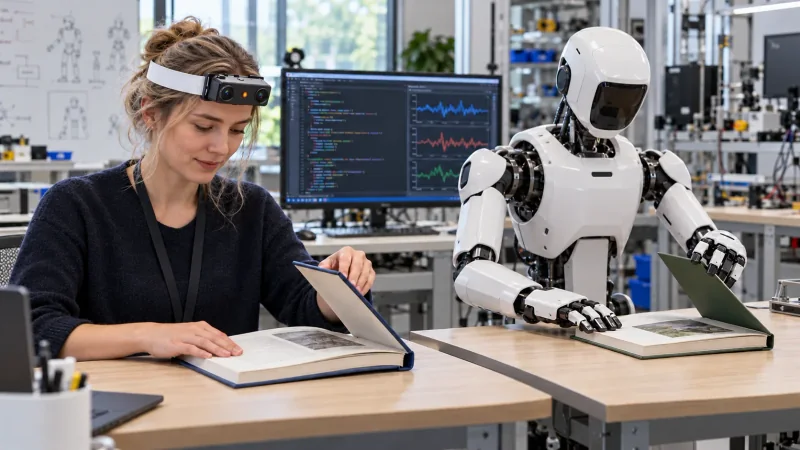
For a human-to-robot study, the team can organize separate human and robot trials around the same book-closing instruction. A reviewer can select corresponding cover-lowering phases and inspect the two trials alongside one another. The illustration presents that proposed setup: the R9 wearer and robot perform matching actions at their own worktables, while a laboratory computer shows example code and inertial signal plots prepared for review.
Keep the R9 recording package together
R9 supports camera intrinsics, H.265 video in MP4 format, a T-Flash card and an external battery. Prepare the recording configuration and supplied camera information for the session, then check a saved complete take. Retain the video, provided IMU and timing records, camera information and researcher-created episode sheet together. This gives visual inertial data collection an identifiable unit of work: a book changing from open to closed, with the wearer's viewpoint motion available for review over the same task interval.