
Visual-Inertial Research / Target Reaching / Original EGO R9 application guide; Stanford HEAD reaching research / Oct 27, 2026
Visual Inertial Data Collection: Target Reaching with R9
Plan visual inertial data collection with EGO R9 for target-reaching research: 1080P global-shutter video, a six-axis IMU above 200 Hz and shared timing.
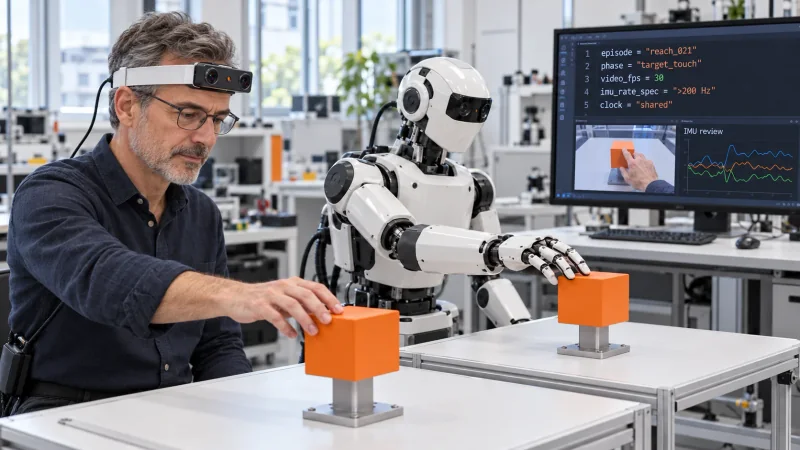
How can R9 support visual inertial data collection for reaching?
- Record the look–reach–touch–return sequence with R9 1080P global-shutter video at 30 FPS.
- Retain the six-axis IMU records with the documented sampling specification above 200 Hz.
- Use shared-clock and global-timestamp support to organize camera and inertial intervals for review.
- Researchers create target identifiers, phase labels, review code and corresponding robot trials.
Visual inertial data collection can connect a visible action with the head movement occurring around it. A laboratory reaching study needs both: the target entering the working view and the hand arriving at that target. EGO R9 offers head-mounted 1080P global-shutter video at 30 FPS, a six-axis IMU sampling above 200 Hz, shared-clock support and global timestamps. This guide proposes an R9 recording organized around looking toward a fixed target, extending the hand to touch it and returning to the starting position.
Research basis: goal-directed reaching
Stanford's Hand-Eye Autonomous Delivery (HEAD) research studies how human visual and motion data can support humanoid navigation and reaching. Its experiments include reaching to touch objects at different locations and heights. That documented target-reaching task motivates the focused laboratory sequence here. The R9 manufacturer specification establishes the camera and inertial functions used in this guide; the research team defines its task protocol, prepares the records and develops the subsequent robot-learning experiment.
Define an R9 look–reach–touch episode
Place a fixed target within the demonstrator's reach and give it a target identifier. Begin each R9 take with the hand at its agreed starting position. Ask the wearer to look toward the target, reach until the fingers touch it, withdraw the hand and return to the initial view. Keep the approach and withdrawal in the same recording. Note the target location and the hand used, so the observed contact belongs to a defined goal rather than an isolated frame of an outstretched arm.
Keep the target and reaching hand in view
R9's 120° wide-angle lens and adjustable camera angle help set the working view for this sequence. Check a saved rehearsal from the initial posture through target contact. Select an angle that includes the target surface and the approaching fingers as the wearer changes head direction. If the study moves a target to another height, repeat that framing check at the new location. The target identifier and the selected wearing arrangement should remain associated with the R9 take during later review.
Review first contact in the R9 video
Use the documented 1080P, 30 FPS configuration as the session's video setting. R9's global shutter exposes the frame together while the wearer turns toward the target or extends the arm. Review the target boundary and the finger outline around the approach and first visible touch. Record the frame references selected by the reviewer and retain the complete original video. This makes a contact label traceable to the actual images and acquisition setting used in the trial.
Associate inertial intervals with the observed reach
R9 specifies a six-axis IMU with a sampling rate above 200 Hz. Its shared unified clock and global-timestamp support provide the timing basis for reviewing the image and motion records together. Researchers can select the inertial interval associated with the observed head turn, then inspect the interval around target contact. Keep the recorded timing references intact when extracting those intervals. The session notes should distinguish the manufacturer's sampling-rate specification from the actual configuration and records supplied for the research session.
Build a researcher-created phase index
Create a phase index for the R9 take: target-view change, hand departure, target approach, first visible touch and withdrawal. Each reviewed entry can contain the episode identifier, target identifier, phase label, video-frame reference and associated timing interval. The computer in the illustration shows example session code carrying the episode, phase, 30 FPS video setting, IMU sampling specification and shared-clock note. Researchers write this review code and enter the labels, keeping the index linked to the original capture records.
Retain target identity across repeated takes
For repeated R9 trials, change one documented target location at a time and retain a separate take identifier. HEAD's experiments make target location and height part of the reaching task definition; the proposed collection can record those choices in a simple target sheet. Review the visible point of first touch for each take before using its phase index. Keep any selected clip with its full source recording, so a researcher can revisit how the wearer looked toward that particular target and completed the reach.
Review corresponding human and robot task phases
The laboratory's human-to-robot study can use the same target-reaching instruction for a separate robot trial. Researchers prepare the learning inputs, configure the robot experiment and select corresponding task phases for review. A human clip and a robot clip may be organized around first target contact while retaining their own trial identifiers and timing records. The illustration shows matching contact postures at separate target stations. Its paired action and computer display represent this researcher-arranged study and review concept.
Prepare the R9 visual-inertial recording package
R9 lists H.265 video in MP4 format, T-Flash card support and an external battery connection. Prepare the chosen storage and power arrangement before collecting repetitions, then check a complete saved look–reach–touch–return take. Keep the original video, the session's provided inertial and timing records, target sheet and reviewed phase index together. For an R9 evaluation, share the target arrangement, required video configuration and visual-inertial recording needs with the EGO team. This gives visual inertial data collection a concrete, reviewable role in target-reaching research.