
Wearable Research / Drawer Manipulation / Original EGO R8 application guide; EgoBridge drawer-placement research / Oct 20, 2026
Wearable Camera for Research: Drawer Placement with R8
Use R8 as a wearable camera for research into drawer placement: synchronized global-shutter stereo, timestamped review and corresponding human-robot task phases.
How can R8 record drawer-placement demonstrations for research?
- Use R8 head-mounted stereo to record pickup, placement, release and drawer closing as one continuous demonstration.
- Common hardware triggering pairs the global-shutter left and right camera observations.
- Retain unified camera/IMU timestamps and log the selected 100, 200 or 500 Hz six-axis IMU setting.
- Researchers label drawer-specific events and organize human recordings with robot trials at corresponding task phases.
A wearable camera for research can record how a person selects a drawer, moves an object into it and finishes the interaction. With EGO R8 worn on the forehead, the demonstrator's working view follows the reach from the object's starting place to the drawer interior. R8 combines dual global-shutter stereo cameras with common hardware triggering. A proposed drawer-placement study can use those paired observations to examine the visible sequence of carrying, lowering, releasing and closing, while keeping each demonstration tied to its intended drawer.
Research basis: wearable demonstrations and a drawer task
Punamiya and colleagues' EgoBridge study provides a relevant research setting. Its human data comes from a wearable, first-person collection platform, and its real-world drawer task involves picking up a toy, placing it into a pre-opened drawer and closing the drawer. The study also varies drawer locations between its human and robot collections. These documented activities motivate the R8 recording plan here. The R8 manufacturer specification establishes the capture functions; researchers define the task records, annotations, learning procedure and robot trials.
Define the target drawer and the complete placement sequence
Give each target drawer a stable identifier in the collection notes, with its row and column recorded before the take. Begin with the chosen drawer open and the object at a documented starting place. Ask the R8 wearer to pick it up, carry it over the drawer lip, lower it into the interior, release it and push the drawer shut. Record the whole sequence continuously. This keeps the intended destination, the hand's route and the final drawer state together for later review of the same demonstration.
Frame the drawer opening from the R8 wearing position
Set the R8 wearing position by checking a short placement at the actual cabinet. Its specified horizontal 115° and vertical 80° field of view help plan a frame containing the hand, object and target drawer. R8 uses fixed-focus lenses, so inspect the working view with the hand over the lip and deeper inside the drawer. Include the upper and lower target positions planned for the session in this framing check. The research team can then select cabinet positions and a natural standing distance from the recorded test footage.
Keep left and right observations paired at placement events
R8's common hardware trigger and shutter signal synchronize its left and right camera observations. During drawer placement, that pairing is useful at visible transitions such as the object crossing the drawer edge, the fingers opening and the palm moving onto the drawer front. Its global-shutter sensors expose the pixels together as those movements occur. Review the corresponding left and right frames at these phases, retaining the original pair references so both images remain associated with the same recorded event throughout the team's analysis.
Preserve camera and IMU timing around head movement
The built-in six-axis IMU offers selectable 100, 200 or 500 Hz sampling, with unified timestamps for camera frames and IMU samples. In a drawer session, the wearer may look down toward a low drawer or turn toward another target position. Record the selected IMU rate with the take, and preserve the shared timing references when exporting the camera and inertial records. Researchers can use those references to examine the head-motion samples around a visible reach or placement event as part of their chosen analysis.
Annotate pickup, release and drawer closure
Create a drawer-specific event sheet for reviewing the R8 recording: object pickup, arrival above the target opening, lowering, hand release, first contact with the drawer front and completion of the closing movement. Attach each observed interval to the take and drawer identifiers. Keep the frames around release in the same review segment, because they show the object entering the interior and the fingers withdrawing. These annotations describe what reviewers observe in the recording and give the collection a consistent event vocabulary.
Organize corresponding human and robot task phases
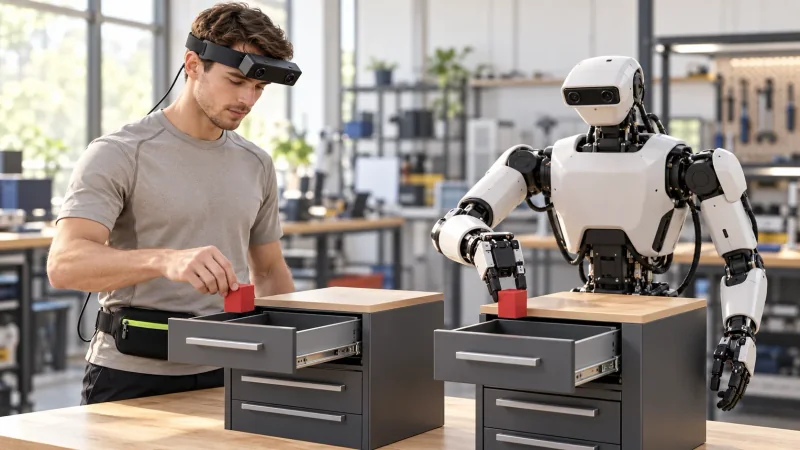
For the human-to-robot part of the study, researchers can prepare a robot trial with the same task definition and target-drawer identifier. Select a phase such as lowering the object into the opening, then organize the R8 human clip and the robot trial around that shared phase. Keep their recording identifiers and timing records with the paired review entry. The illustration shows the person and robot at corresponding placement stages in their respective cabinets. The team arranges the robot operation and learning experiment, using the human recording as demonstration material.
Prepare the R8 capture connection and take records
Prepare the R8 session around its documented USB 2.0 interface and DC 5 V power requirement. The supplied SDK/API is part of the capture integration to discuss with the EGO Camera team. For a pilot, confirm that the chosen capture setup retains the left/right frame references, selected IMU configuration and timestamps in the team's recording workflow. Keep the cabinet layout, drawer identifier and event sheet beside those files. Review one complete pickup-to-closure take before collecting the remaining target positions.
Start with a focused drawer-placement pilot
A focused pilot should answer a concrete research question: can reviewers follow which drawer was selected, when the object was released and how the hand moved from placement to closing? R8 brings synchronized stereo recording and unified visual-inertial timing to that capture plan. Evaluating a wearable camera for research in this way connects its confirmed functions to a specific manipulation sequence. Discuss the required R8 configuration, capture integration and sample recordings with the EGO Camera team when preparing the study.
Research references and confirmed R8 specifications
EgoBridge research - wearable human demonstrations and drawer manipulation