
Research / Bimanual Tool Use / Original EGO R8 application guide; DexCap scissor-cutting research / Oct 26, 2026
Wearable Camera for Research: Scissor Cutting with R8
Use EGO R8 as a wearable camera for research on bimanual scissor cutting, with synchronized stereo, shared camera–IMU timing and reviewed task labels.
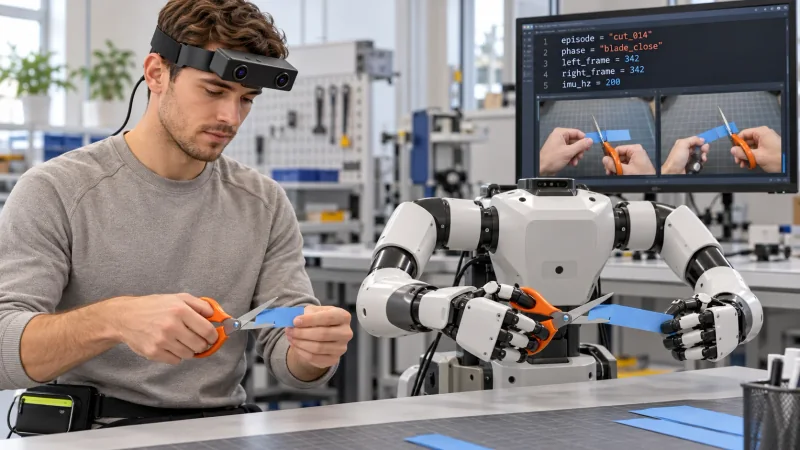
How can R8 record bimanual tool use for research?
- Record both hands, the scissors and the paper edge with R8 head-mounted stereo capture.
- Keep common-triggered left/right observations with their original frame references.
- Retain configured 100 / 200 / 500 Hz IMU samples and unified camera–IMU timestamps.
- Researchers create phase labels, review code and corresponding robot trials for the paper-cutting task.
A wearable camera for research should preserve the interaction a laboratory wants to study. In bimanual scissor cutting, that interaction includes the fingers holding the tool, the other hand supporting the paper and the blades meeting its edge. EGO R8 brings dual global-shutter stereo capture and common hardware triggering to a proposed first-person recording of this sequence. Researchers can use the recorded observations to prepare a paper-cutting study, review action phases and organize human demonstrations for their robot-learning experiments.
Research basis: bimanual scissor cutting
Wang and colleagues' DexCap paper, published at Robotics: Science and Systems 2024, includes scissor cutting among its bimanual manipulation tasks. Its task description has one hand grasping scissors while the other holds a paper strip, bringing both toward the working area before cutting. The paper and official project also present learned robot executions of the task. This provides the activity basis for the R8 collection proposed here. The laboratory team develops the learning method and robot trials; R8 specifications come from its manufacturer document.
Define the R8 paper-cutting episode
For an R8 session, give the paper strip and scissors a documented starting position on the bench. Record the demonstrator selecting the tool, lifting the paper, placing its edge between the blades, closing the scissors and presenting the cut edge. Keep the supporting hand visible while it adjusts the strip between cuts. Give each take an episode identifier and note the tool hand, paper hand and intended cut. The complete sequence lets a reviewer distinguish preparation, blade contact and the resulting change in the paper.
Frame the scissors and supporting hand
Position the forehead-mounted R8 by rehearsing the cut in the demonstrator's working posture. The listed 115° horizontal and 80° vertical fields of view help plan a view containing both hands, the scissor pivot and the paper edge. Its lenses are fixed focus. Inspect a saved sample with the scissors near the paper and again as the supporting hand moves the strip forward. Choose the wearing position from those actual images, checking both camera views before recording the planned repetitions.
Preserve paired R8 observations of blade motion
R8's two global-shutter sensors expose the pixels within each image together. The common hardware trigger/shutter signal synchronizes the left and right camera observations. Keep the corresponding stereo pair when reviewing a blade closure or a change in finger grip. Retain the source frame references through any clip extraction so a paper-edge observation in one view can be retrieved with its paired image. These features connect the R8 capture arrangement directly to a moving tool interaction at the bench.
Review cutting phases with traceable code records
Build a researcher-created event record around visible phases: tool grasp, paper positioning, blade approach, blade closure and cut-edge inspection. Link each interval to its R8 episode and original camera timestamps. A laboratory review script can display the episode identifier, the selected left/right frame references and the phase entered by a reviewer. The illustration's computer code represents this kind of session bookkeeping. Store the reviewed labels with the original recordings so later changes to an interval retain a clear link to the source footage.
Keep visual and inertial records on shared timing
The R8 specification lists a six-axis IMU with selectable 100, 200 or 500 Hz sampling and unified timestamps for camera frames and IMU samples. A wearer may look from the tool to the supported paper during positioning. Retain the selected IMU rate and the timestamped samples with that take. For a session configured at 200 Hz, for example, the review record can carry that setting beside the selected camera interval. Researchers can then inspect the recorded head-motion samples around a visible cutting phase.
Retain calibration with the working images
Associate the R8 unit's delivered calibration record with the paper-cutting session. The manufacturer describes unit-specific camera intrinsics, distortion coefficients and stereo extrinsics where applicable. Keep the record together with the actual image dimensions and capture settings. If the research team prepares a crop around the blades for closer review, document the crop and retain the original images. This keeps subsequent image or stereo-geometry analysis connected to the recorded tool and paper observations.
Organize corresponding human and robot task phases
For the human-to-robot stage, the laboratory team can prepare a learning experiment and a separate robot trial using the same paper-cutting task definition. Review the human and robot sequences at corresponding phases, such as bringing the paper between the blades or completing a cut. Keep each trial's own identifiers and timing records, and document how the team selects the corresponding phases. The illustration places a human demonstrator and a robot at the same blade-closing stage; its screen is an editorial concept for researcher-arranged data review.
Prepare a focused R8 research pilot
Prepare the R8 recording host around USB 2.0 and the documented DC 5 V supply, with maximum working current of 320 mA. Arrange the cable and waist-carried external power connection before handling the paper and tool. The manufacturer lists SDK/API delivery for capture integration; discuss the required interfaces and recording settings with the EGO team. A pilot should yield a complete, reviewable cut, its paired camera references, configured inertial records and a checked event sheet. This gives a wearable camera for research a specific role in a bimanual tool-use study.